Every number, computed live from one ledger.
Helm computes every financial figure from one reconciled ledger and foots to the filed tax return to the cent. Recategorize a transaction and the entire picture updates — and stays reconciled.
- Revenue
- $994,217.44
- Expenses
- −$669,826.93
- Profit
- $324,390.51
✓ Foots to the ledger, to the cent
- 184 Auto-matched
- 0 Need review
What is Helm?
Helm is a financial operating system for businesses with more than one division. It computes every figure live from one reconciled transaction ledger — company, division and monthly P&L, forecasts, appraisal and reports — and foots to the filed tax return to the cent, with filed years locked read-only.
Your books close eventually. The questions don't wait.
-
What did we actually make this month — not what the bank balance suggests?
Helm answers this -
Which division is carrying the business, and which one is quietly losing money?
Helm answers this -
Does our P&L tie out to the tax return, or just come close?
Helm answers this -
If a transaction gets recategorized, does every report update — or only the one someone touched?
Helm answers this -
What would an appraiser say our adjusted earnings are?
Helm answers this -
Where will the year land, based on what has actually happened so far?
Helm answers this
Most finance stacks answer these with a spreadsheet and a week of reconciling. Helm answers them live.
Import the bank data. Let the rules place it. Read the business live.
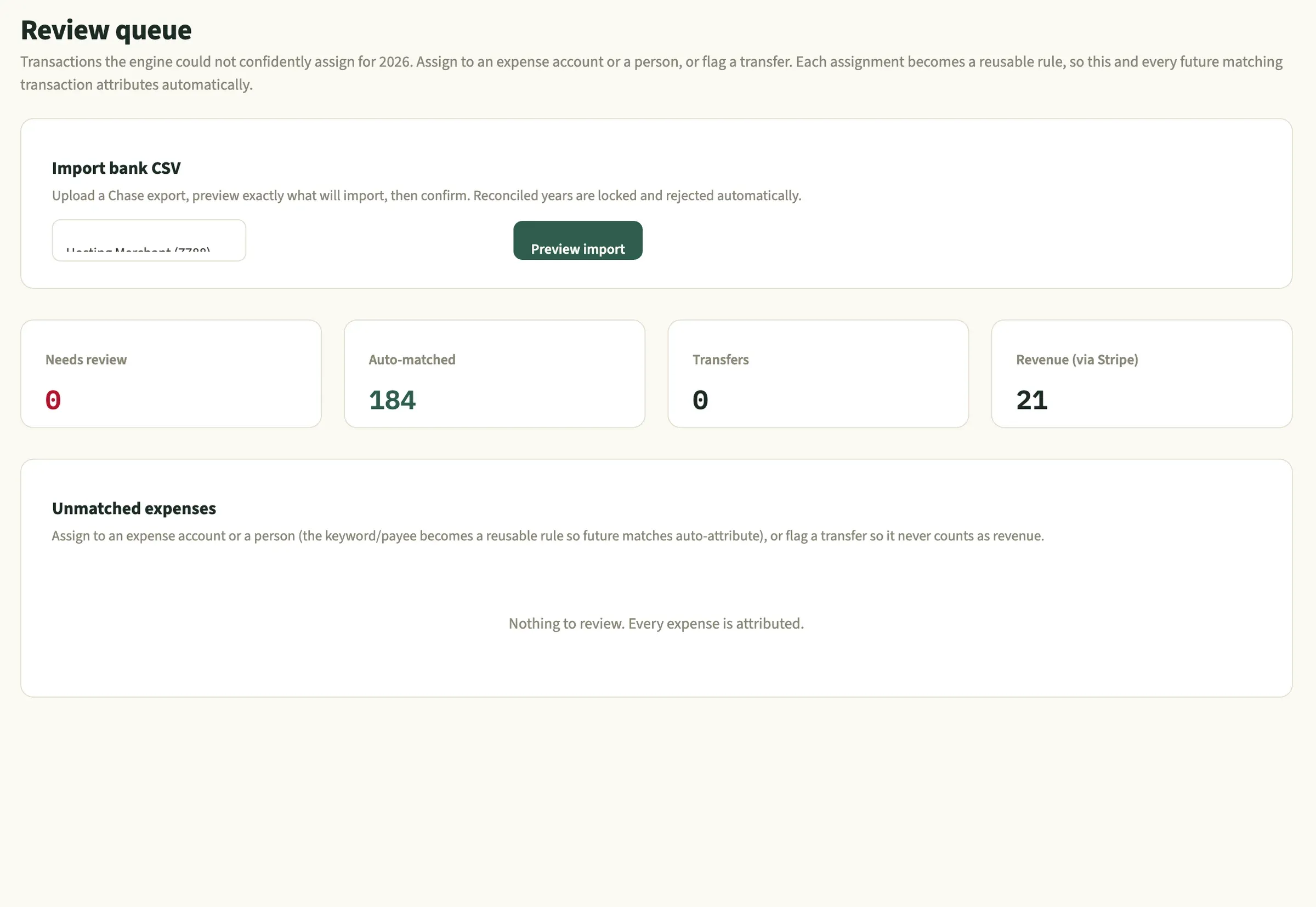
- 01 · Import
Bring in the bank data, safely
Upload a bank export and preview exactly what will import before anything is written. Duplicates are skipped, and any row that falls in a filed year is rejected automatically.
- Preview first, then commit
- Filed years locked and protected
- Duplicates detected and skipped
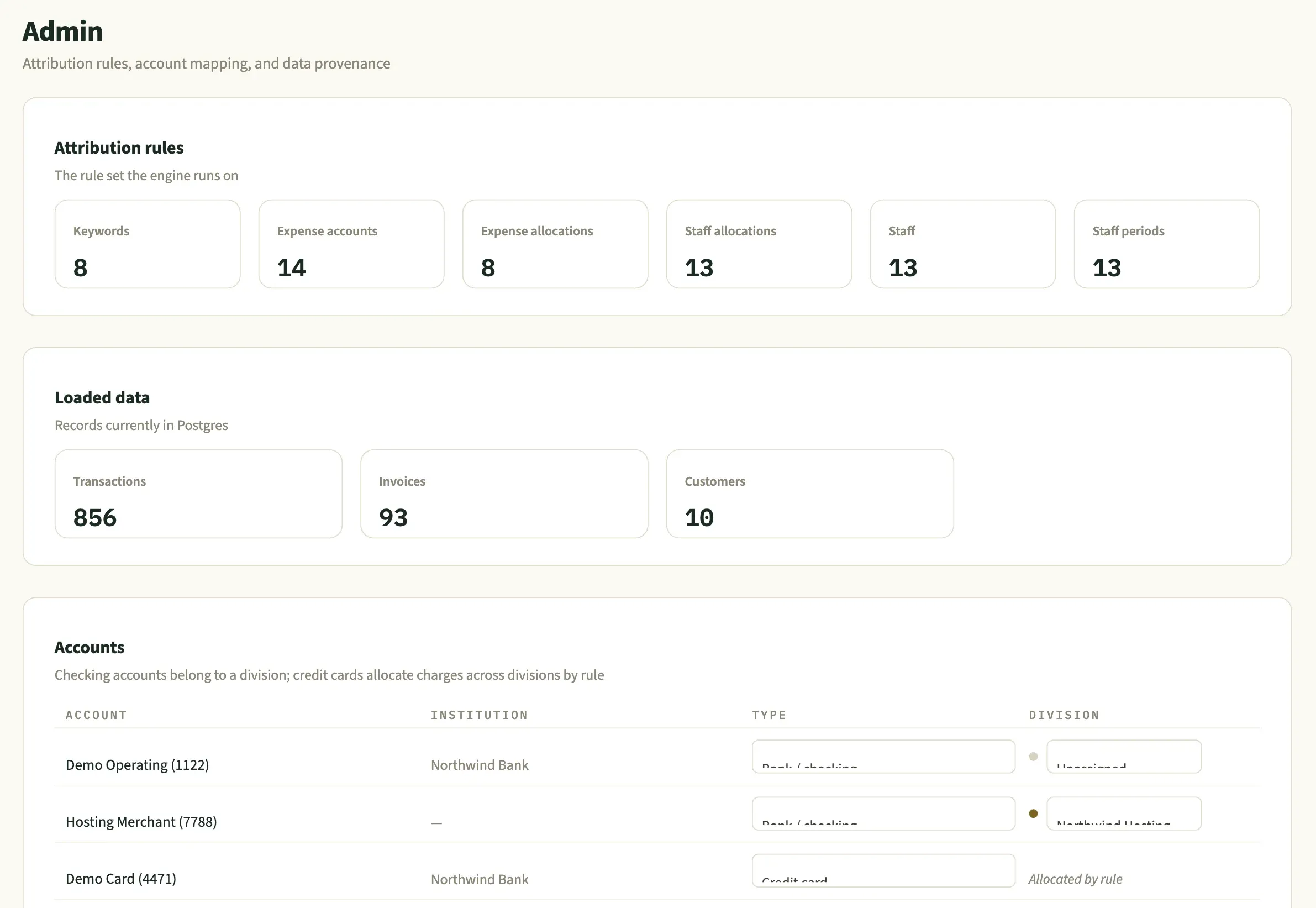
- 02 · Attribute
Every transaction finds its place
A rules engine learns from each payee and keyword, splits shared costs across divisions, and scores its own confidence. Anything it can't place confidently goes to a review queue — and every answer becomes a rule for next time.
- Confidence-scored categorization
- Shared costs split across divisions by rule
- Each review decision becomes a reusable rule
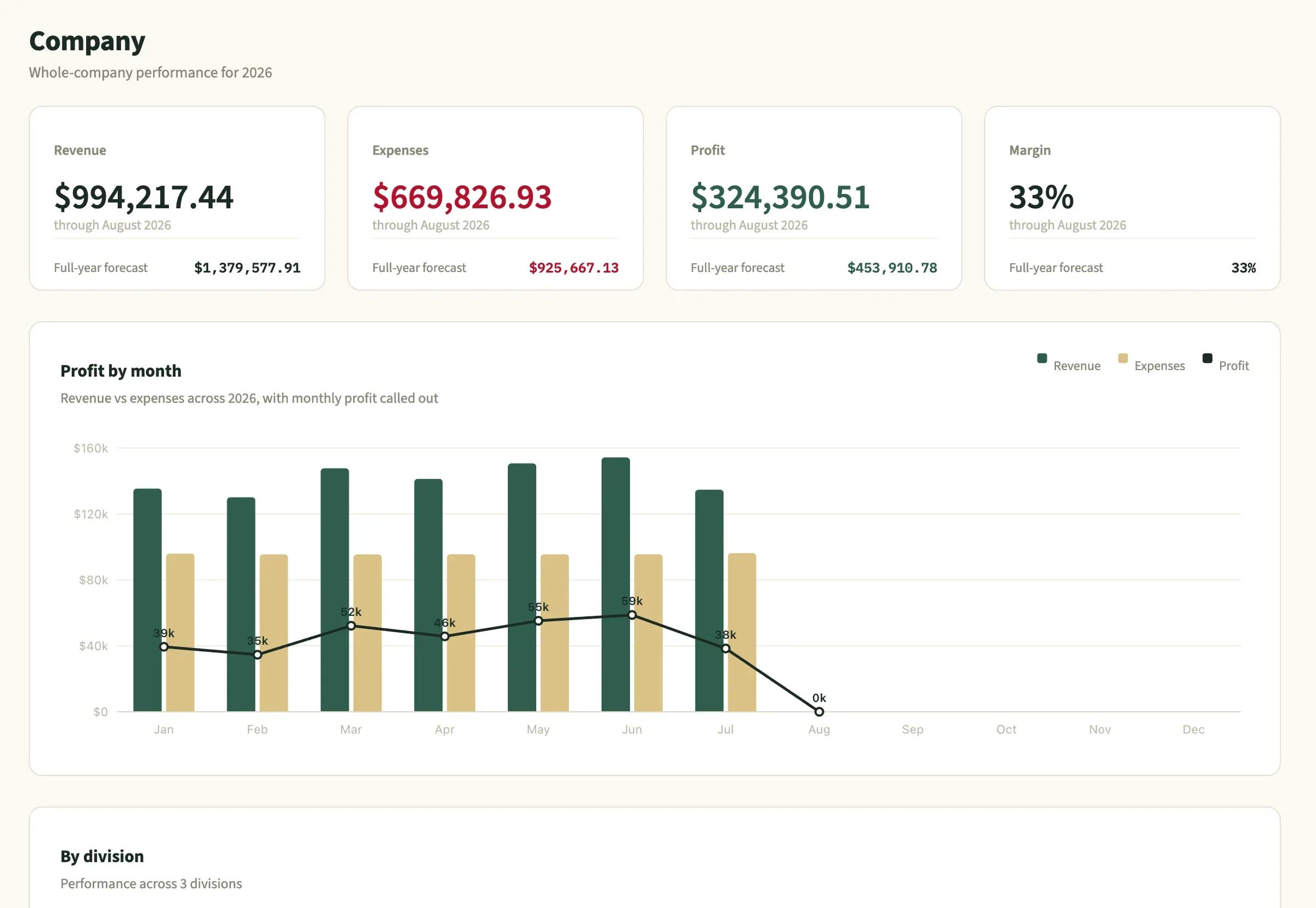
- 03 · Report
Read the business, live
Company, division and P&L views are recomputed from the ledger every time you look, with a full-year forecast built from actuals so far.
- Nothing hardcoded or snapshotted
- Full-year forecast from real actuals
One ledger, every view of the business
Company, divisions, month-by-month P&L and saved reports — all computed from the same reconciled ledger, so they can never disagree.
The whole business, on one screen
Revenue, expenses, profit and margin through today, each with a full-year forecast, then profit by month and performance by division.
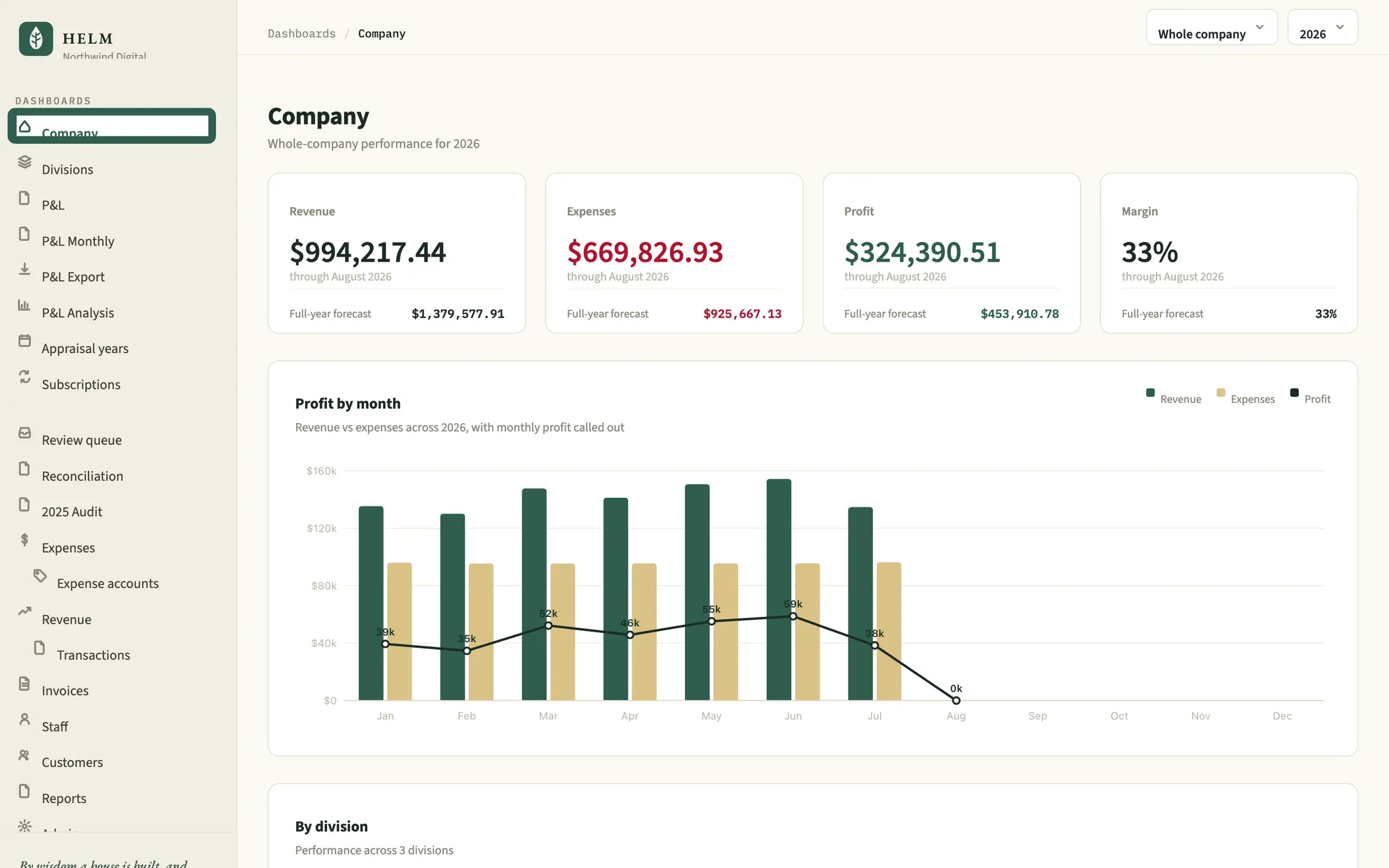 1 Actuals to date, with a full-year forecast 2 Scope to any division or year 3 Monthly profit called out on every bar
 - 1 Actuals to date, with a full-year forecast
- 2 Scope to any division or year
- 3 Monthly profit called out on every bar
Every division, side by side
Revenue and profit per division, with a reconciliation that proves the divisions add back up to net income — unallocated costs shown, never hidden.
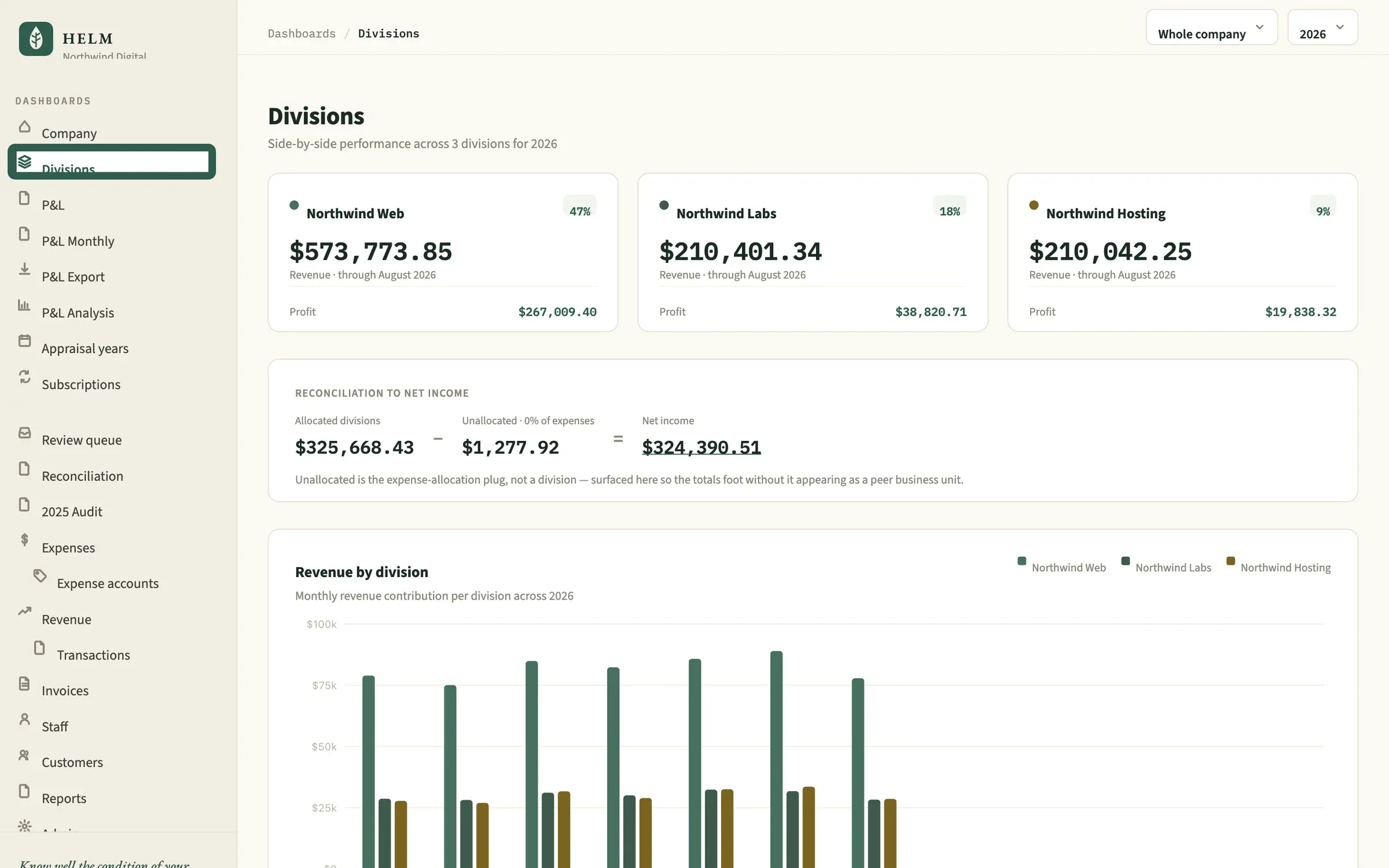 1 Revenue, profit and margin per division 2 Divisions reconcile to net income, to the cent 3 Monthly revenue by division
 - 1 Revenue, profit and margin per division
- 2 Divisions reconcile to net income, to the cent
- 3 Monthly revenue by division
Month by month, line by line
Every P&L line across every month. Months still in progress are faded, so incomplete data is never mistaken for a trend.
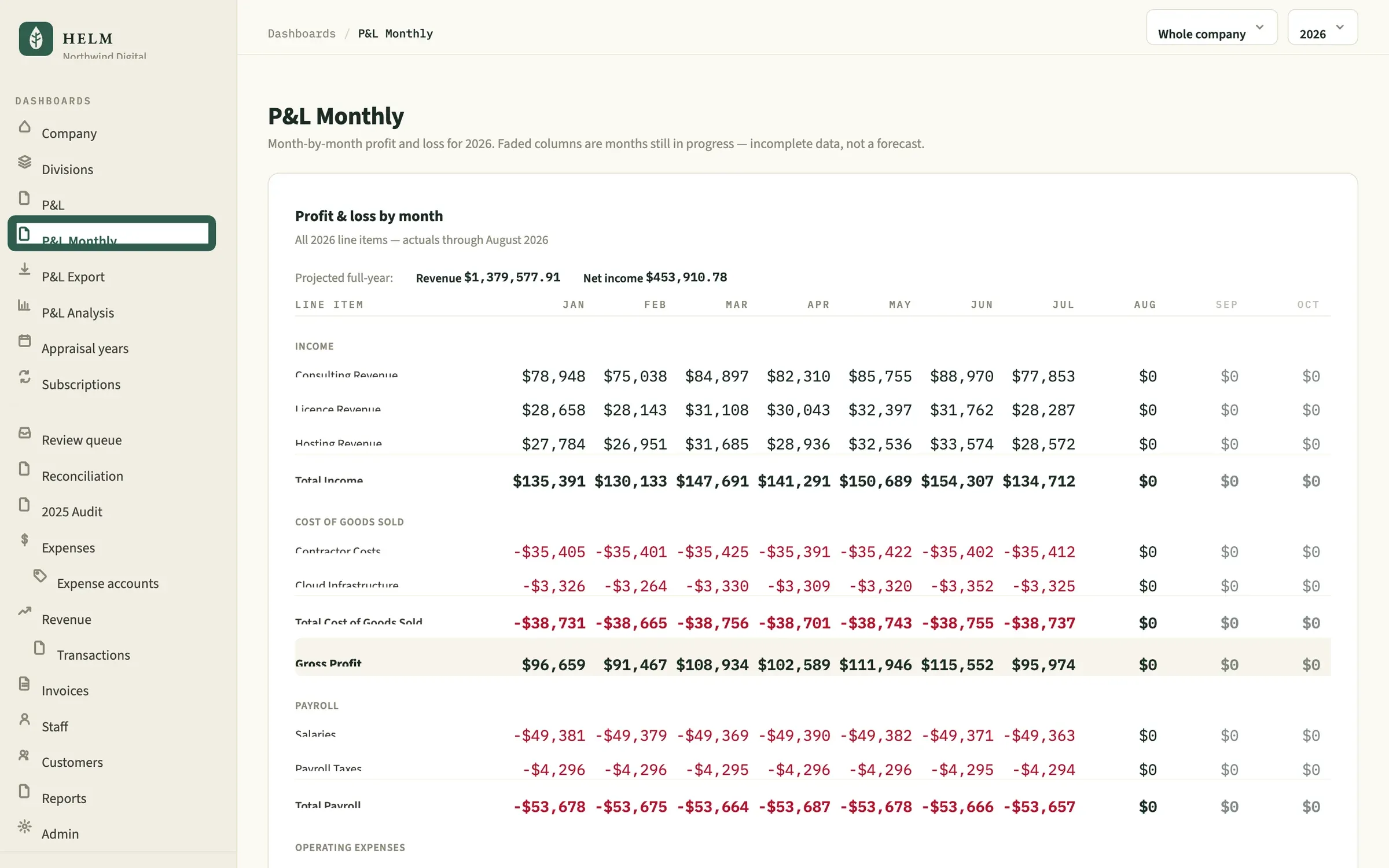 1 Months in progress are faded — never read as a trend 2 Income, COGS, payroll and expenses in P&L order 3 Every line, every month, with section subtotals
 - 1 Months in progress are faded — never read as a trend
- 2 Income, COGS, payroll and expenses in P&L order
- 3 Every line, every month, with section subtotals
Reports that stay put
Every report is a snapshot saved as of the moment it ran. Re-running creates a new one and leaves the old one exactly as it was.
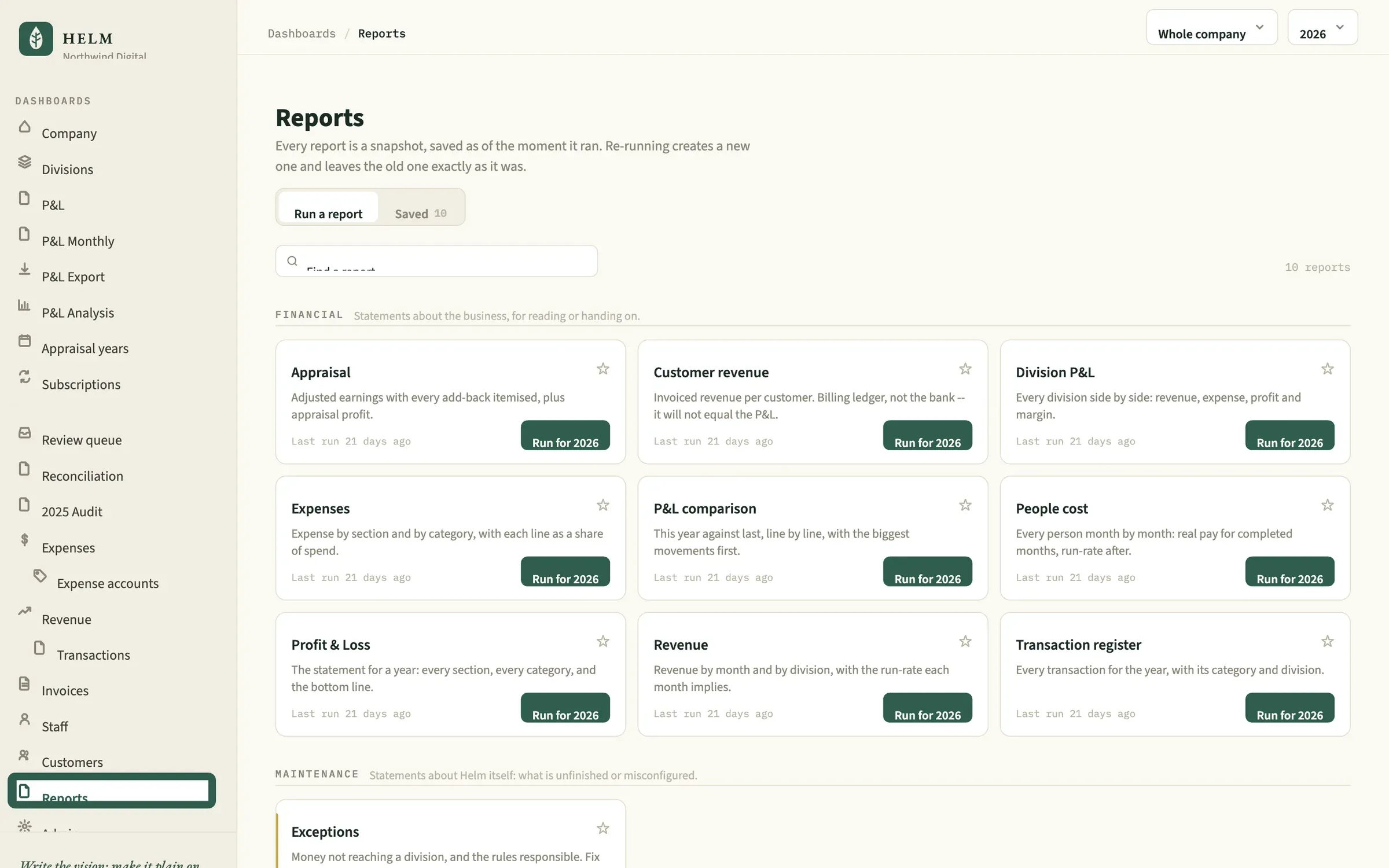 1 Saved as of the moment each report ran 2 Every run kept — nothing overwritten 3 Maintenance reports flag what is misconfigured
 - 1 Saved as of the moment each report ran
- 2 Every run kept — nothing overwritten
- 3 Maintenance reports flag what is misconfigured
It has to add up. To the cent.
Helm doesn't store totals — it recomputes them from the ledger every time you look. So the P&L adds up, the divisions reconcile to net income, and nothing drifts between reports.
Unallocated is the expense-allocation plug, not a division — surfaced so the totals foot without it posing as a business unit.
- 1Recomputed on every request
No hardcoded totals, no snapshots carried forward. Every figure is the live sum of the ledger.
- 2Filed years are locked
Once a year is reconciled to the return it becomes read-only. Edits and imports that touch it are rejected.
- 3Tested against the return
Baseline tests fail the build if the reconciled total drifts by a single cent.
Reported profit and appraisal, kept apart
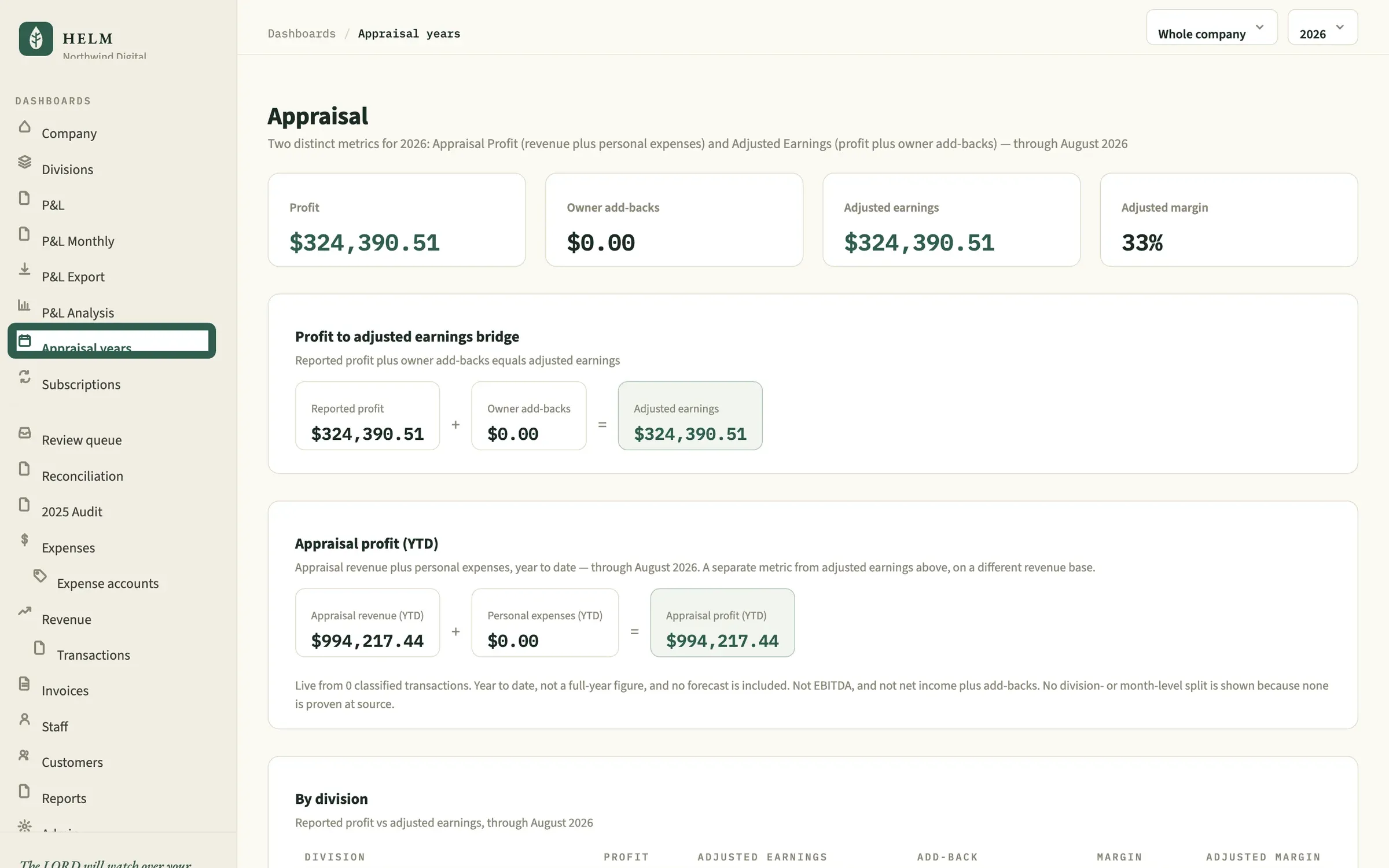
Accountants need the filed P&L. Owners preparing for a sale or valuation need adjusted earnings. Helm keeps both — and one never changes the other.
The filed statement
The profit and loss exactly as it reconciles — every section, every line, and the bottom line that matches the return.
Adjusted earnings
Owner add-backs itemized on top of reported profit, with appraisal profit alongside — a separate lens that never alters the filed P&L.
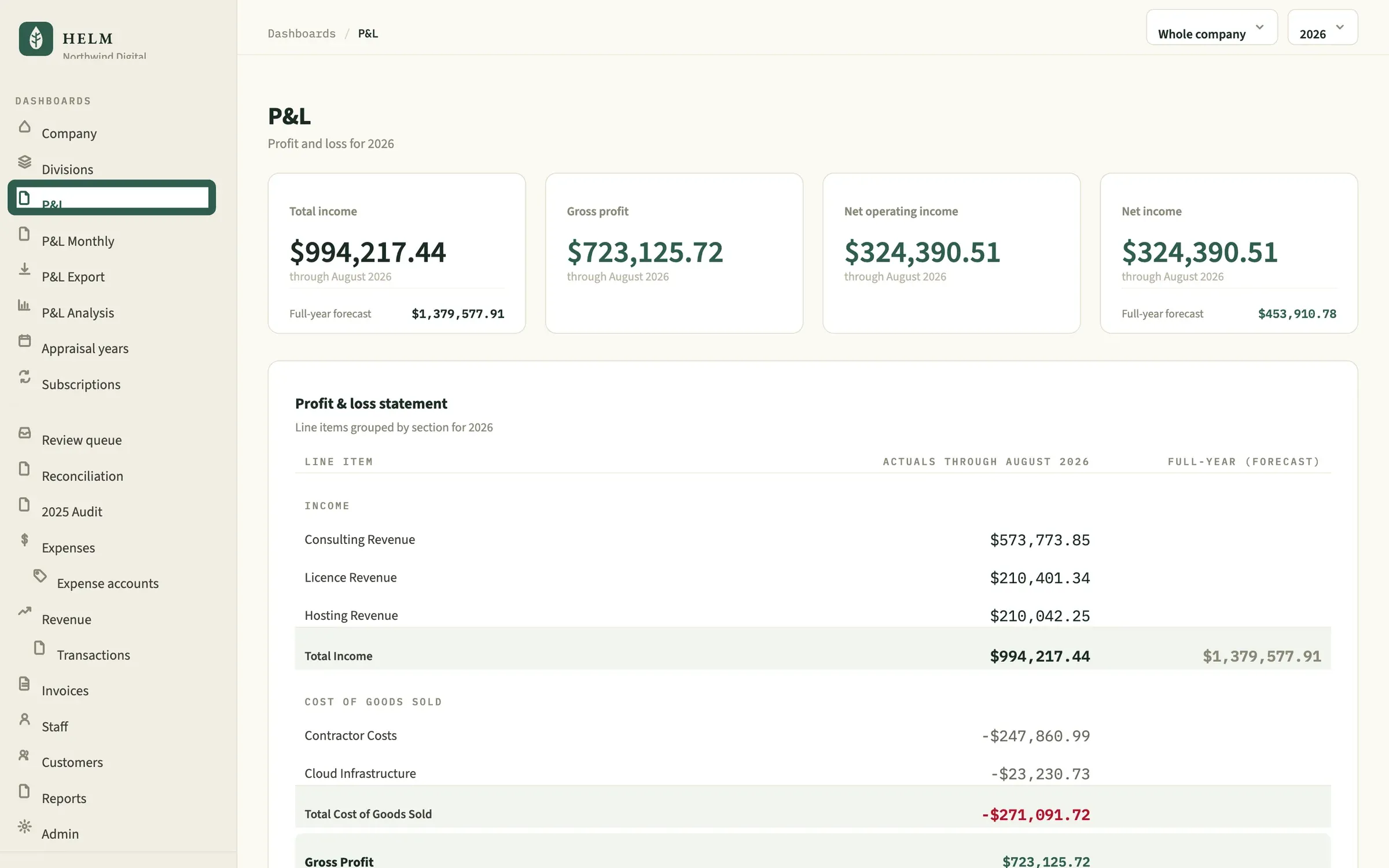
Every source, reconciled into one place
Checking accounts belong to a division; card charges are allocated across divisions by rule.
- Bank exports (CSV)
- Credit cards
- Stripe
- QuickBooks general ledger
- Invoices
- Payroll and staff costs
One reconciled ledger. Every figure recomputed on request — nothing hardcoded, nothing snapshotted.
- Company and division P&L
- Monthly P&L with forecast
- Appraisal and adjusted earnings
- Saved, versioned reports
The people who sign off on the numbers
- 01
Owners
See what the business actually earned, by division, without waiting for month-end.
- 02
Accountants and CPAs
Books that foot to the return, with filed years locked and every figure traceable to the ledger.
- 03
Multi-division businesses
Shared costs split by rule, and divisions that always reconcile back to net income.
Questions about Helm
Where does Helm get its data?
From bank and card exports, Stripe revenue and the QuickBooks general ledger, with invoices, payroll and staff costs attributed to divisions. Data from a legacy system such as Airtable can be migrated in.
How does Helm stay reconciled to the tax return?
Every figure is recomputed from the ledger each time you look — nothing is hardcoded or snapshotted — and baseline tests fail the build if the reconciled total drifts by a single cent.
What happens to a year once it's filed?
It's locked. Edits to a reconciled year are rejected, and imports reject any row dated in a filed year, so the numbers behind a return can't change after the fact.
How are transactions categorized?
A rules engine learns from merchant names and keywords, splits shared costs across divisions and scores its own confidence. Anything it can't place confidently goes to a review queue, and every answer there becomes a rule for future transactions.
How do bank imports work?
In two steps: upload a bank export, preview exactly what will be written, then commit. Duplicates are skipped and malformed rows are rejected.
How does Helm handle multiple divisions?
Checking accounts belong to a division, card charges are allocated across divisions by rule, and anything unallocated is shown as its own reconciliation line — so the divisions always add back up to net income.
What's the difference between reported profit and adjusted earnings?
Reported profit is the filed P&L. Adjusted earnings add owner add-backs — such as interest, contributions, life insurance and retirement contributions — for appraisal purposes. Helm shows both, and the appraisal view never changes the filed P&L.
Does Helm forecast the year?
Yes. Full-year forecasts are built from actuals to date, and months still in progress are shown faded so incomplete data is never read as a trend.
Can we export reports?
Yes. The P&L exports as a spreadsheet-ready CSV, and every report is saved as a snapshot of the moment it ran — re-running creates a new one and leaves the old one exactly as it was.
How can we see Helm on our own numbers?
Request a demo and we'll walk through Helm with you.
Where Helm fits
Services
More platforms
- TIP Business and agency operations, unified. →
- Bright Commerce Commerce operations and product information. →
- Continuum Cited, agentic AI memory for legal and financial work. →
- SchoolTracker.ai Marketing intelligence, trusted by 300+ school brands. →
- Shepard Church management software that tells staff what needs attention. →