Run the church. See what needs you this week.
Shepard brings people, groups, sermons, serving, check-in, giving and events into one record — then reads it for you. Every week it surfaces the groups that are slipping, the newcomers nobody has called and the rotas that are short, before Sunday arrives.
Two groups are at risk, Sunday's sermon is under-prepared, and a newcomer has gone two weeks without a follow-up.
- Nursery At risk
- Tuesday Men's Breakfast At risk
- The Narrow Gate · prep 0% Sermon
- Riley Stone · idle Outreach
- 28 Active groups
- 34 Slots open
What is Shepard?
Shepard is church management software. It keeps a church's people, groups, sermons, serving, check-in, giving and events in one record, gives members their own portal, and tells staff each week what needs attention — groups slipping, sermons under-prepared, newcomers gone quiet, rotas short — computed from the church's own records and thresholds.
Church software stores the records. Nobody has time to read them.
-
Which groups are quietly slipping, before the leader says anything?
Shepard answers this -
Who visited last month and hasn't heard from anyone since?
Shepard answers this -
Do we have enough people on every team for Sunday?
Shepard answers this -
Is this week's sermon actually ready?
Shepard answers this -
Was nobody at that meeting — or did nobody take attendance?
Shepard answers this -
Has last week's giving been reconciled and committed?
Shepard answers this
Shepard keeps the whole church in one record and reads it every week, so staff start Monday with a short list instead of a pile of spreadsheets.
Plan Sunday. Follow up every newcomer. Fill every team.
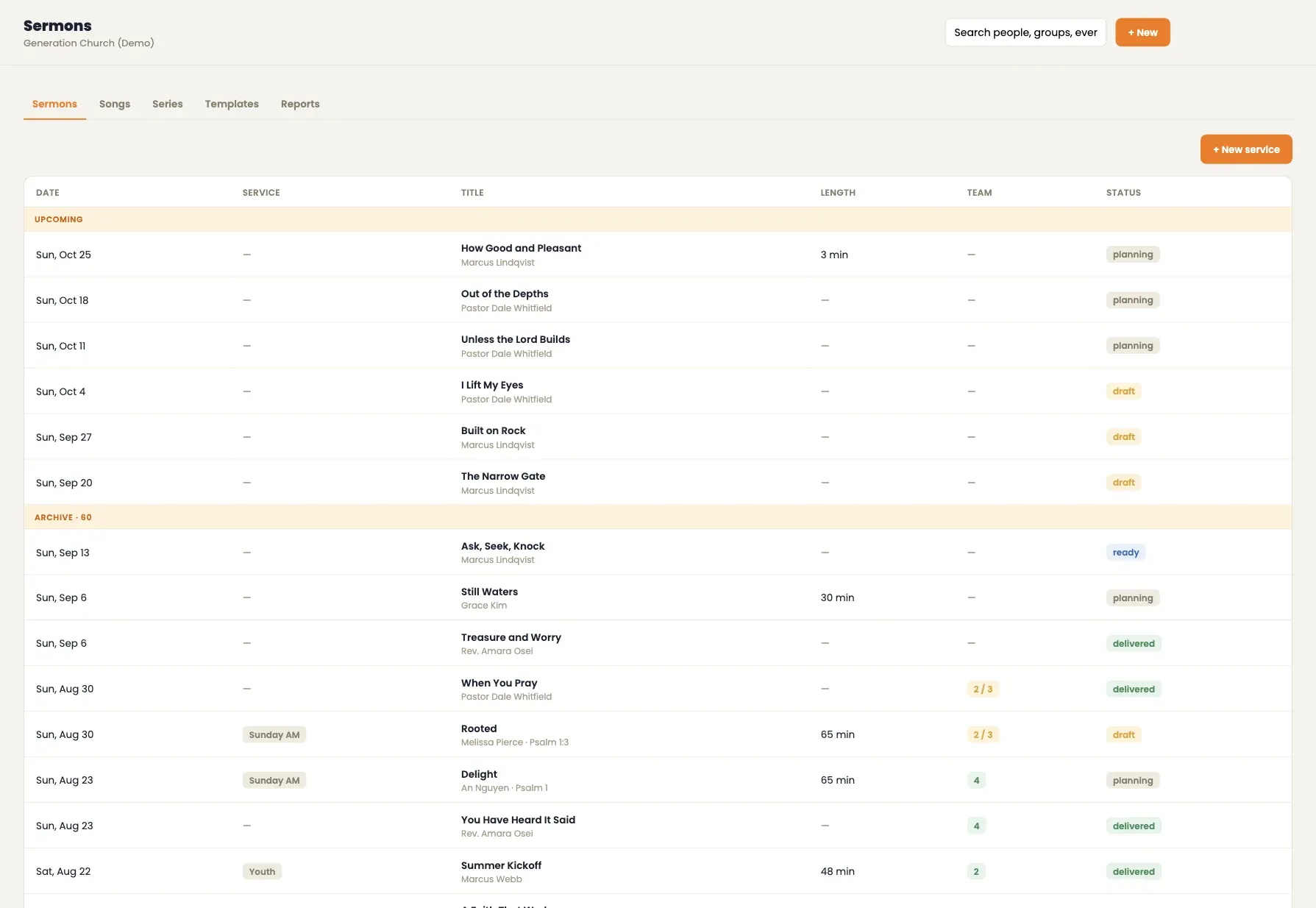
- 01 · Plan
Sunday, planned in one place
Sermons move from planning to draft to ready to delivered, grouped into series and scoped by service type. Songs become lines of the order of service, and service templates set up a new Sunday in one step.
- Series, service types and templates
- Songs as lines of the order of service
- Prep tracked against the date
- 02 · Connect
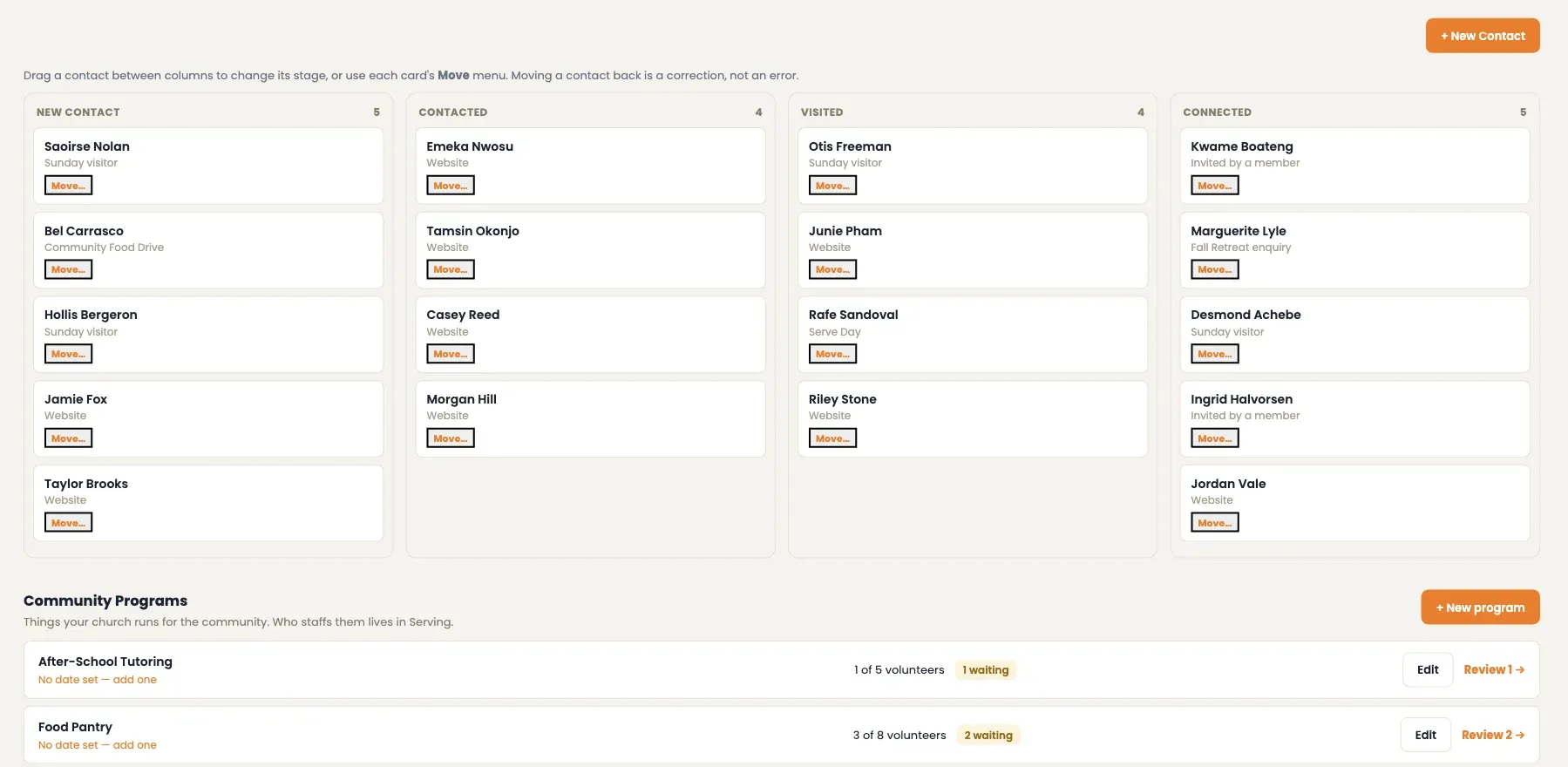
Every newcomer, followed until they're connected
First-time visitors, website enquiries and connect cards land on one board: new contact, contacted, visited, connected. Anyone idle past the church's limit is flagged, and a connected contact becomes a person in the directory.
- Four stages, drag to move
- Idle contacts flagged automatically
- Converts into a directory record
- 03 · Serve
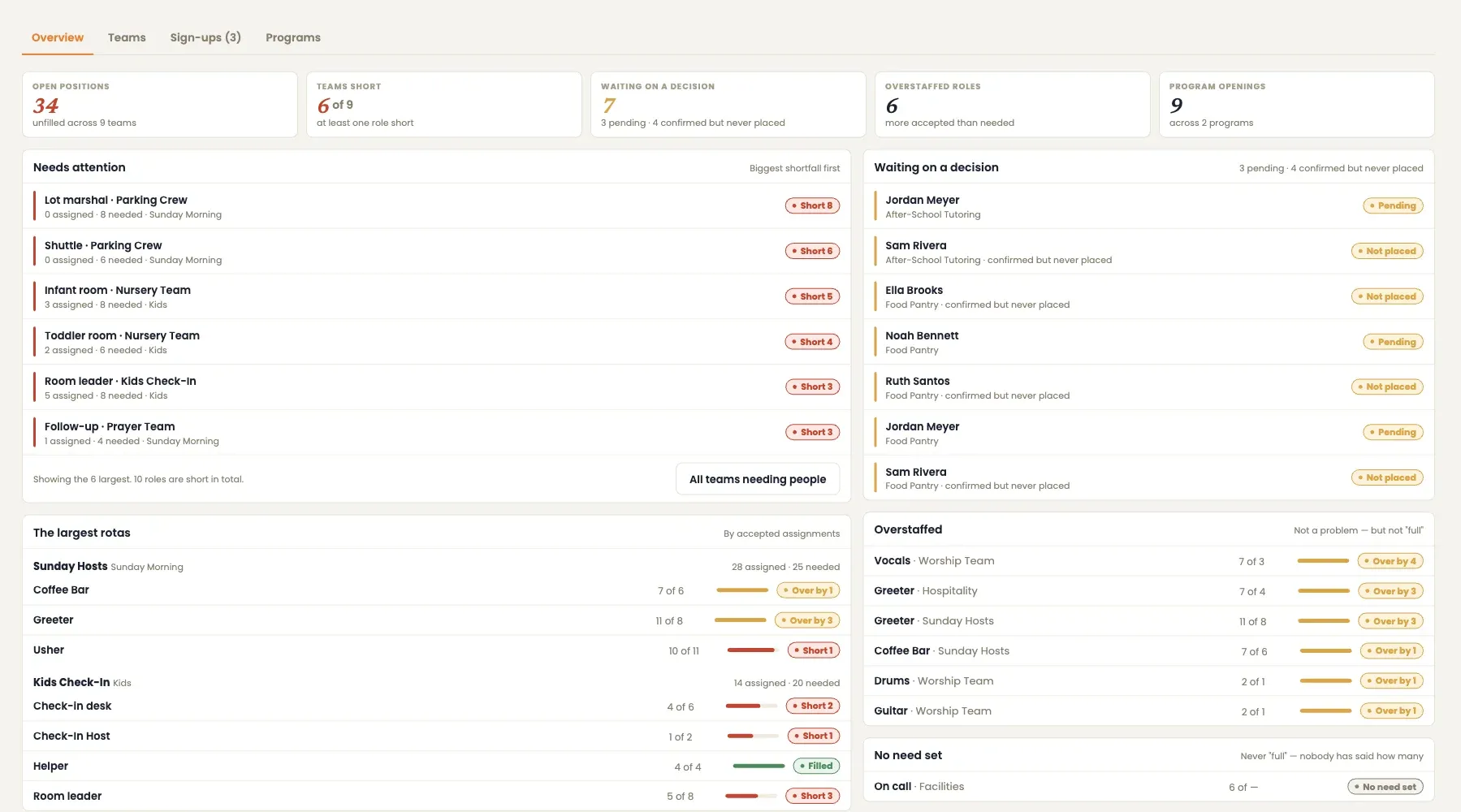
Every team filled before Sunday
See which roles are short, who hasn't answered and where a team is overstaffed. Assigning a volunteer respects their blockout dates, and volunteers accept or decline from their own portal.
- Shortfalls ranked, biggest first
- Blockout-aware assignment
- Accept or decline in the member portal
One record for the whole church
Every screen reads from the same people, groups and events — so a change in one place shows up everywhere it matters.
Monday morning, on one screen
This week's numbers, Sunday's sermon and its prep, the outreach pipeline, and a needs-attention list worked out from the records themselves.
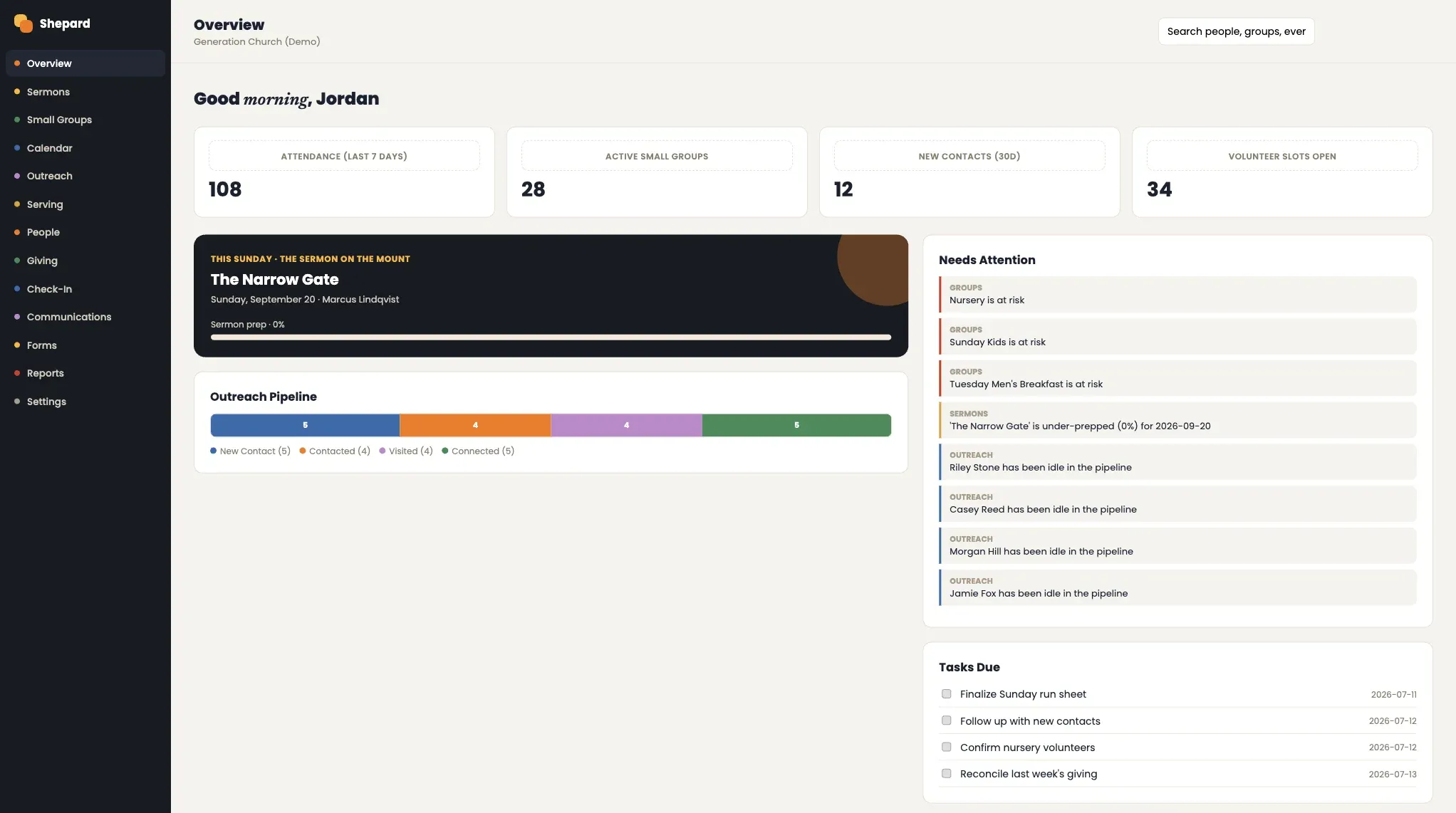 1 This week's numbers, from the records 2 Sunday's sermon and how ready it is 3 Flagged against the church's own limits
 - 1 This week's numbers, from the records
- 2 Sunday's sermon and how ready it is
- 3 Flagged against the church's own limits
Every group, with its health at a glance
Small groups, classes, ministry groups and teams, each marked healthy, watch or at risk, with the roster, join requests, invitations and attendance one click away.
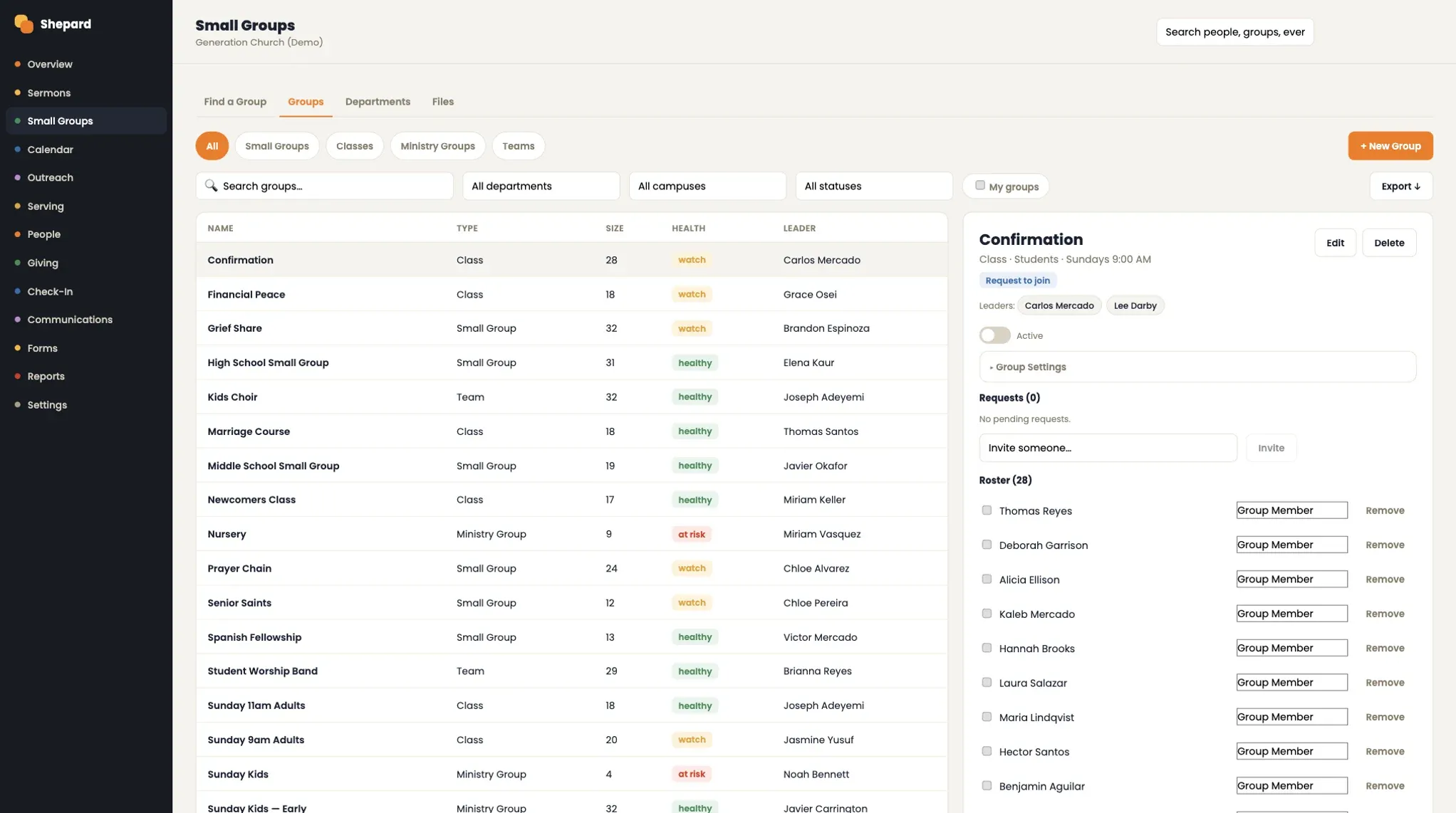 1 Filter by department, campus and status 2 Healthy, watch or at risk 3 Roster, requests and invitations
 - 1 Filter by department, campus and status
- 2 Healthy, watch or at risk
- 3 Roster, requests and invitations
The week ahead, and the records still missing
Upcoming gatherings in church-local time, rooms booked without double-booking, approvals waiting, and meetings where attendance was never taken — which isn't the same as nobody coming.
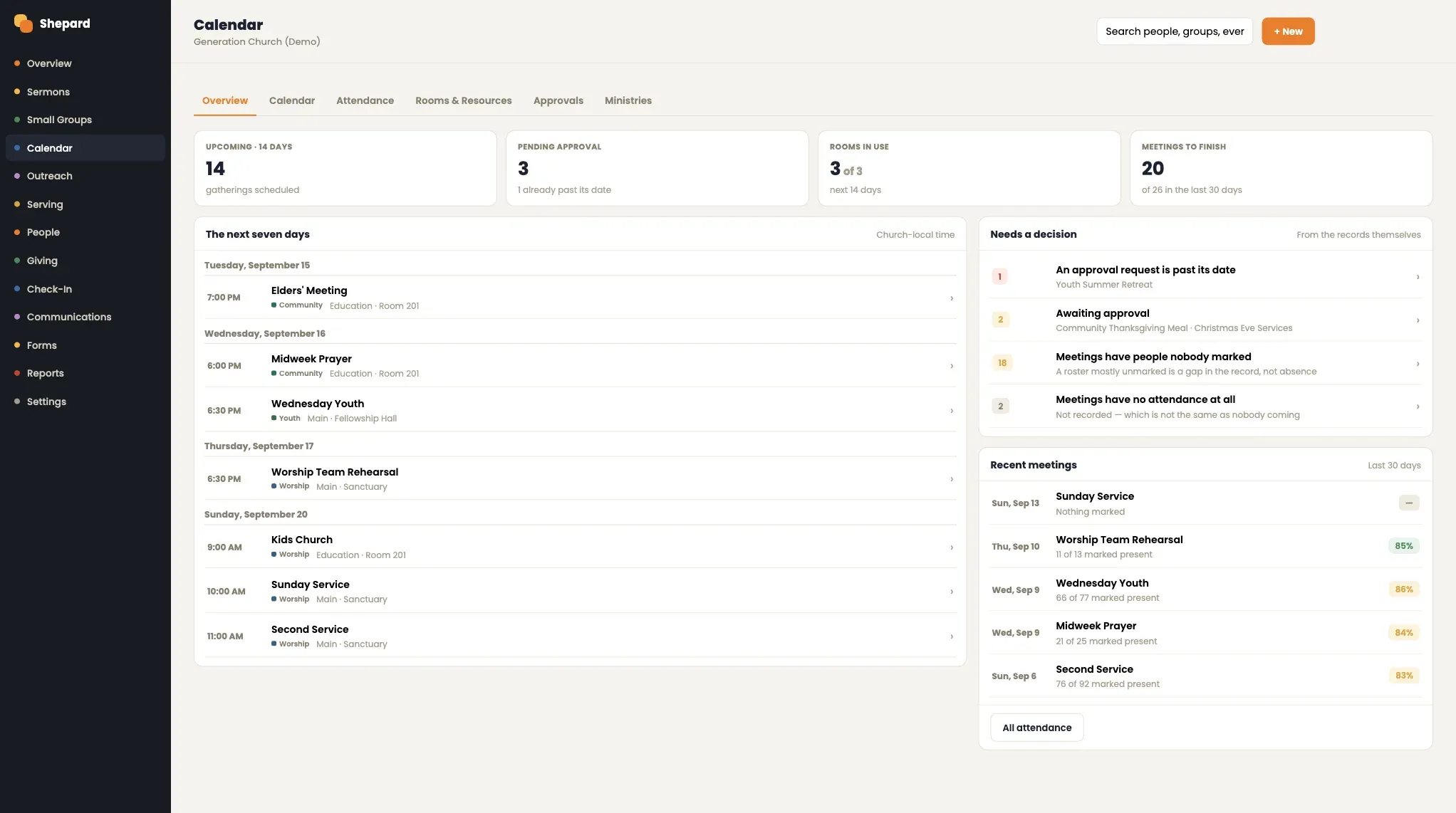 1 The next seven days, church-local time 2 Rooms, never double-booked 3 Approvals and unrecorded attendance
 - 1 The next seven days, church-local time
- 2 Rooms, never double-booked
- 3 Approvals and unrecorded attendance
Answers for the elders' meeting
Nine reports across attendance, groups, serving, people, giving and check-in. A saved report stores the question, never the numbers, so it's recomputed every time someone runs it.
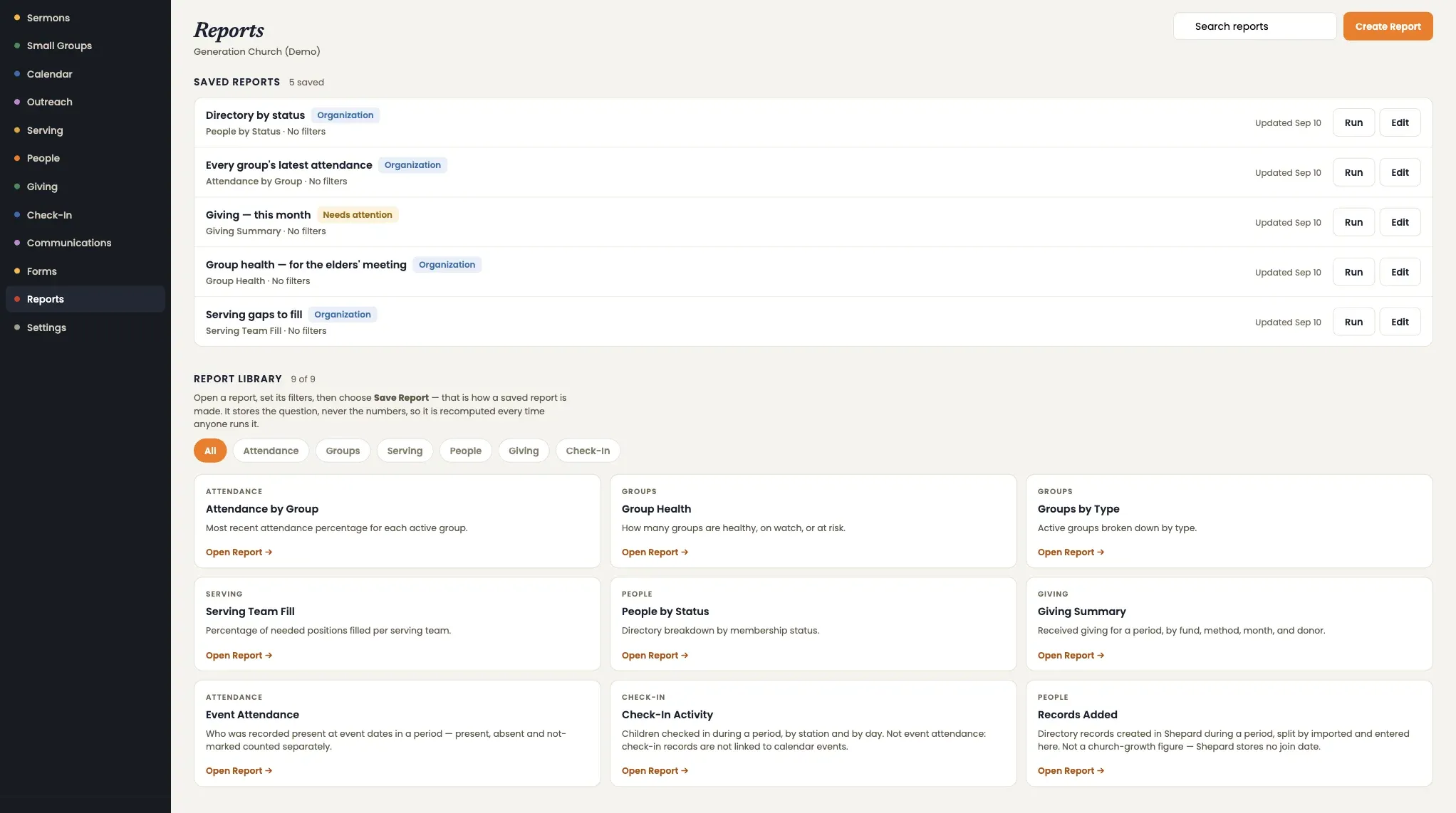 1 Saved reports keep the question, not the numbers 2 Recomputed on every run 3 Attendance, groups, serving, people, giving, check-in
 - 1 Saved reports keep the question, not the numbers
- 2 Recomputed on every run
- 3 Attendance, groups, serving, people, giving, check-in
Worked out from the records, against limits the church sets.
Nothing on the needs-attention list is typed in by hand. Shepard compares what's recorded with the thresholds each church chooses — how early a sermon should be ready, how long a newcomer can wait — and flags the gap.
Ranked biggest shortfall first, with pending replies and overstaffed roles alongside.
The idle limit, sermon prep window and minimum prep are set per church in Settings.
- 1Missing isn't zero
A meeting with no attendance taken is flagged as unrecorded, not reported as empty.
- 2Reports recompute
Saved reports keep the question and rerun it, so the numbers are never stale.
- 3No false “sent”
Messages show as queued until delivery is recorded, with sent and failed counts in the activity feed.
Giving and people, kept straight
The two records a church can't afford to get wrong, each with the controls finance and leadership expect.
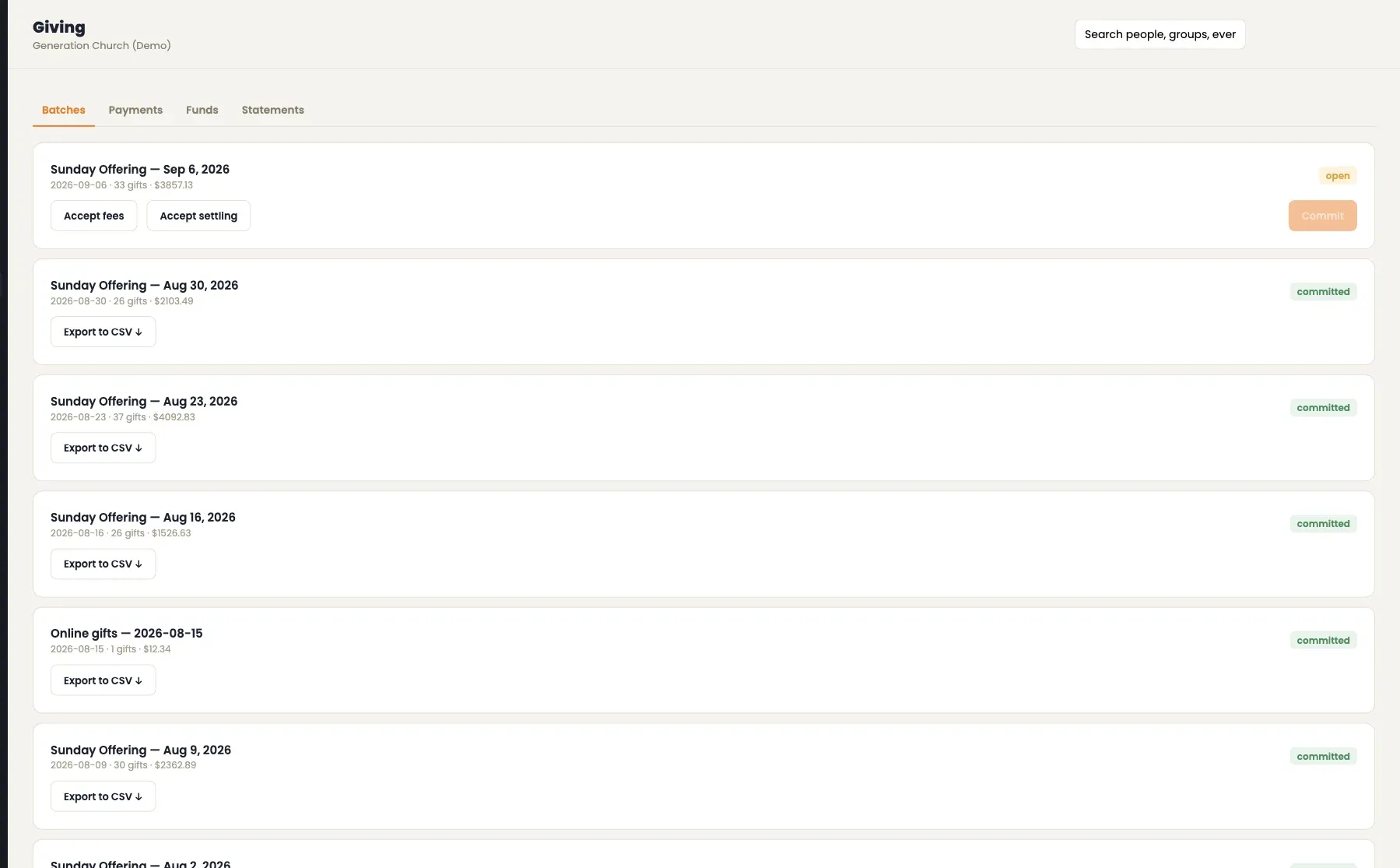
Giving, reconciled batch by batch
Each offering is a batch: accept the fees, accept the settlement, commit it, and export it for the books. Funds, pledges and contribution statements come from the committed record.
One directory, with privacy per field
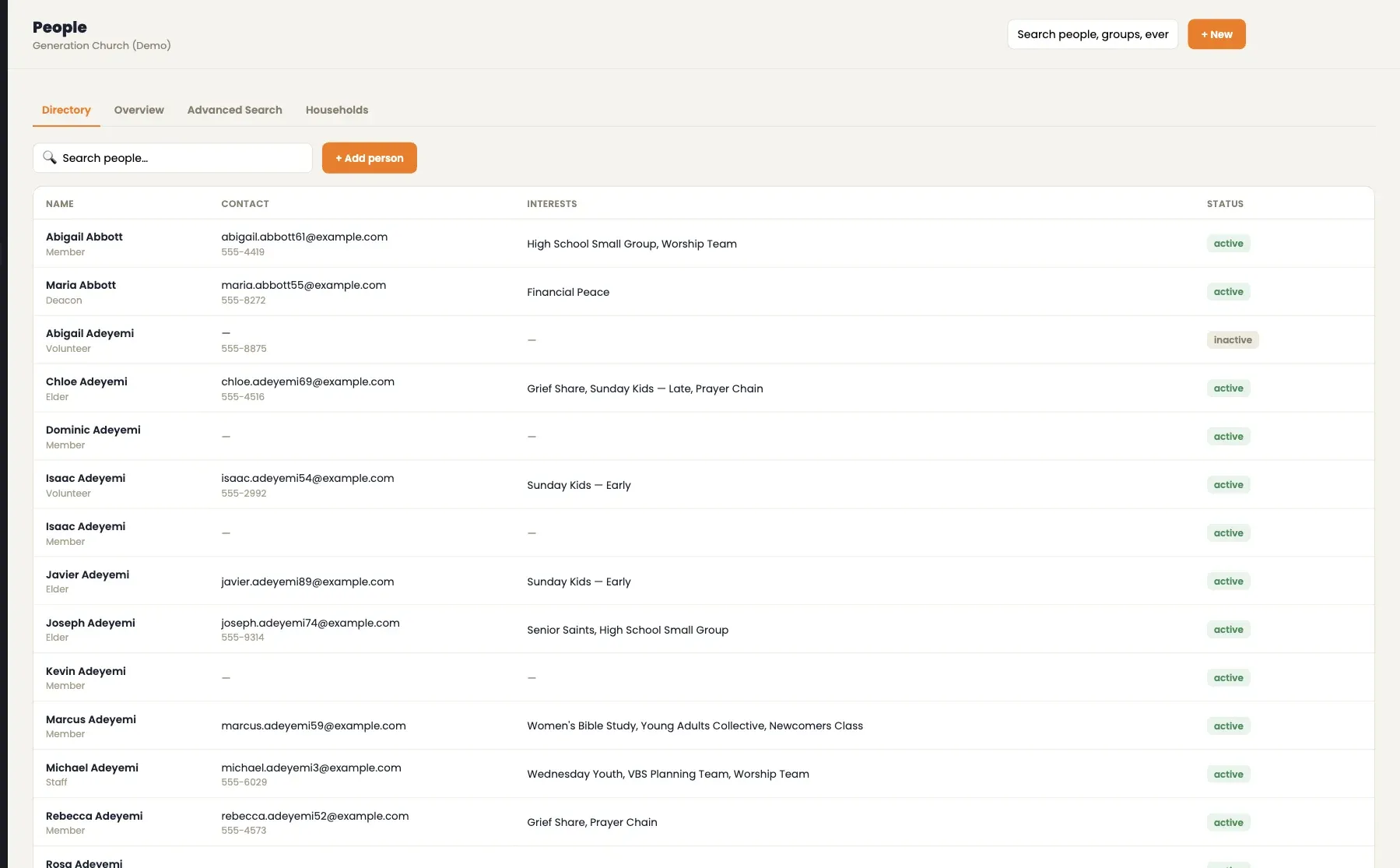
Members, households, roles and the groups each person belongs to, in one searchable directory — with the church deciding which details everyone, group members or only leadership can see.
Everything the church already does, in one place.
Moving from Church Community Builder? People and groups come across, and the import can be re-run without duplicates.
- Church Community Builder import
- Connect cards and public forms
- Check-in stations
- Giving and batches
- Volunteer replies
- Attendance from leaders
People, groups, serving, giving and events in one record — and every flag computed from it.
- A weekly needs-attention list
- Filled serving rotas
- Contribution statements
- Reports for leadership
Everyone who keeps a church running
- 01
Pastors and church leadership
One screen with what needs attention this week, from sermon prep to groups at risk, and reports ready for the elders' meeting.
- 02
Ministry and group leaders
Rosters, attendance, serving rotas and newcomer follow-up, without chasing spreadsheets or group texts.
- 03
Church administrators and finance
Giving batches, funds, statements, exports and privacy settings, with each church's data kept strictly its own.
Questions churches ask about Shepard
What does Shepard replace?
The spreadsheets and separate tools a church uses for its people directory, small groups, sermon planning, serving rotas, kids check-in, giving, events, email and reports. It covers the same ground as church management platforms such as Planning Center.
How does Shepard decide what needs attention?
From the church's own records, compared with thresholds the church sets — how many days before Sunday a sermon should be prepared, the minimum prep percentage, and how long a new contact can go without follow-up. Group health, serving shortfalls and missing attendance are computed the same way.
Can members use Shepard too?
Yes. Members get their own portal on the web to see their serving schedule and accept or decline, block out dates, browse and join groups, RSVP to events, give, and update their own profile.
How does kids check-in work?
Check-in stations let staff or volunteers find a child by the child's, parent's or household's name, check them in, and release them at pickup with a security code. A volunteer who hasn't been cleared can't run a station.
Can we move over from Church Community Builder?
Yes. Shepard imports people and groups from Church Community Builder, and the import can be re-run without creating duplicates.
How is giving handled?
Giving is built on Stripe, so card details go straight to Stripe and never touch the church's servers. Staff reconcile gifts in batches, manage funds and pledges, and generate contribution statements.
Is our church's data kept separate from other churches?
Yes. Shepard is multi-tenant: every request is scoped to the church it belongs to, and automated tests check that one church can never read another's records.
Who can see a member's personal details?
The church decides, field by field — everyone, group members, or leadership only — and staff roles control who can change what.
Is there a mobile app?
Shepard runs in the browser on phones, tablets and computers, including the member portal. A native member app is planned for a later phase.
How can we see Shepard for our church?
Request a demo and we'll walk through Shepard with you.
Where Shepard fits
Services
- Product Innovation & Venture Development Turning ideas into commercial technology, from prototype to product to venture. →
- Technology & Experience Enterprise-grade digital platforms and commerce, grown by marketing that is measured to the dollar. →
- Infrastructure & Integration Enterprise systems, integrations, and knowledge architecture: the consequential work most complexity hides in. →