Your school's data, decoded by AI, in one place.
Search rankings, website behavior, ad performance, and AI visibility, pulled together into one live platform that tells your whole team what is working, what is broken, and the one thing to fix next.
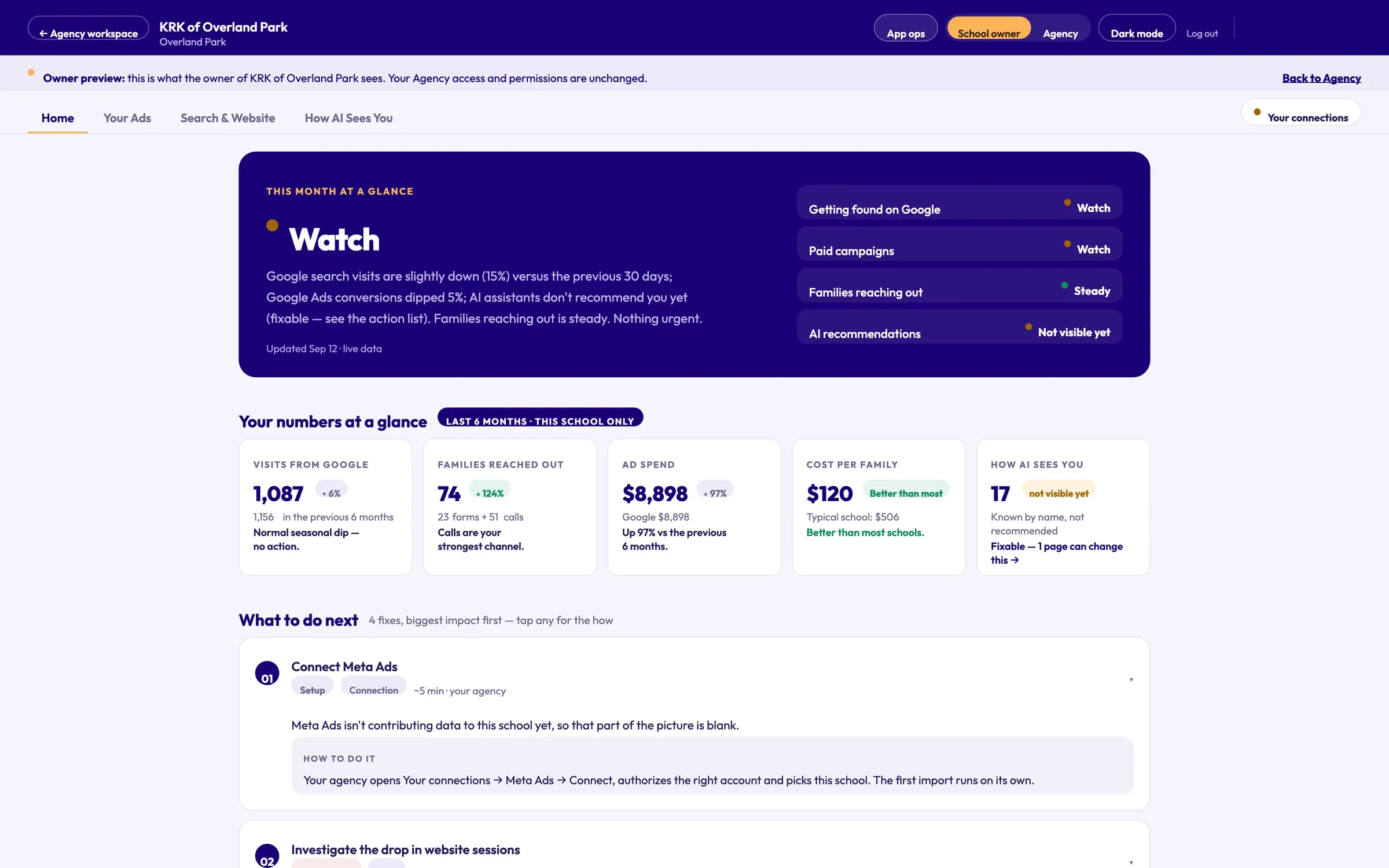
Google search visits dipped this month and AI assistants don't recommend you yet — both fixable. Families reaching out is steady. Nothing urgent.
- Getting found on Google Watch
- Paid campaigns Steady
- Families reaching out Steady
- AI recommendations Not yet
- ChatGPT 22
- Gemini 31
- Claude 11
What is SchoolTracker.ai?
SchoolTracker.ai is a marketing intelligence platform for schools. It connects a school's Google Analytics 4, Search Console and Google Ads accounts, checks every week how ChatGPT, Gemini and Claude answer the questions parents ask, and turns it all into one live dashboard that says in plain English what is working, what is broken, and the one thing to fix next — for school owners and the agencies that serve them.
Your agency sends reports. But can it answer these?
-
Why did my website traffic change last month, and did anyone catch it in time?
SchoolTracker answers this -
Which pages are driving tour requests, and which are dead weight?
SchoolTracker answers this -
How do I rank against the school down the road?
SchoolTracker answers this -
Are families actually finding my school when they search?
SchoolTracker answers this -
Is my paid budget generating enrollment leads, or just clicks?
SchoolTracker answers this -
When a parent asks ChatGPT for the best school near them, does my name come up?
SchoolTracker answers this
If the answer to any of these is “I'm not sure,” that is the gap SchoolTracker.ai closes.
Connect once. Read it in plain English. Fix the one thing that matters.
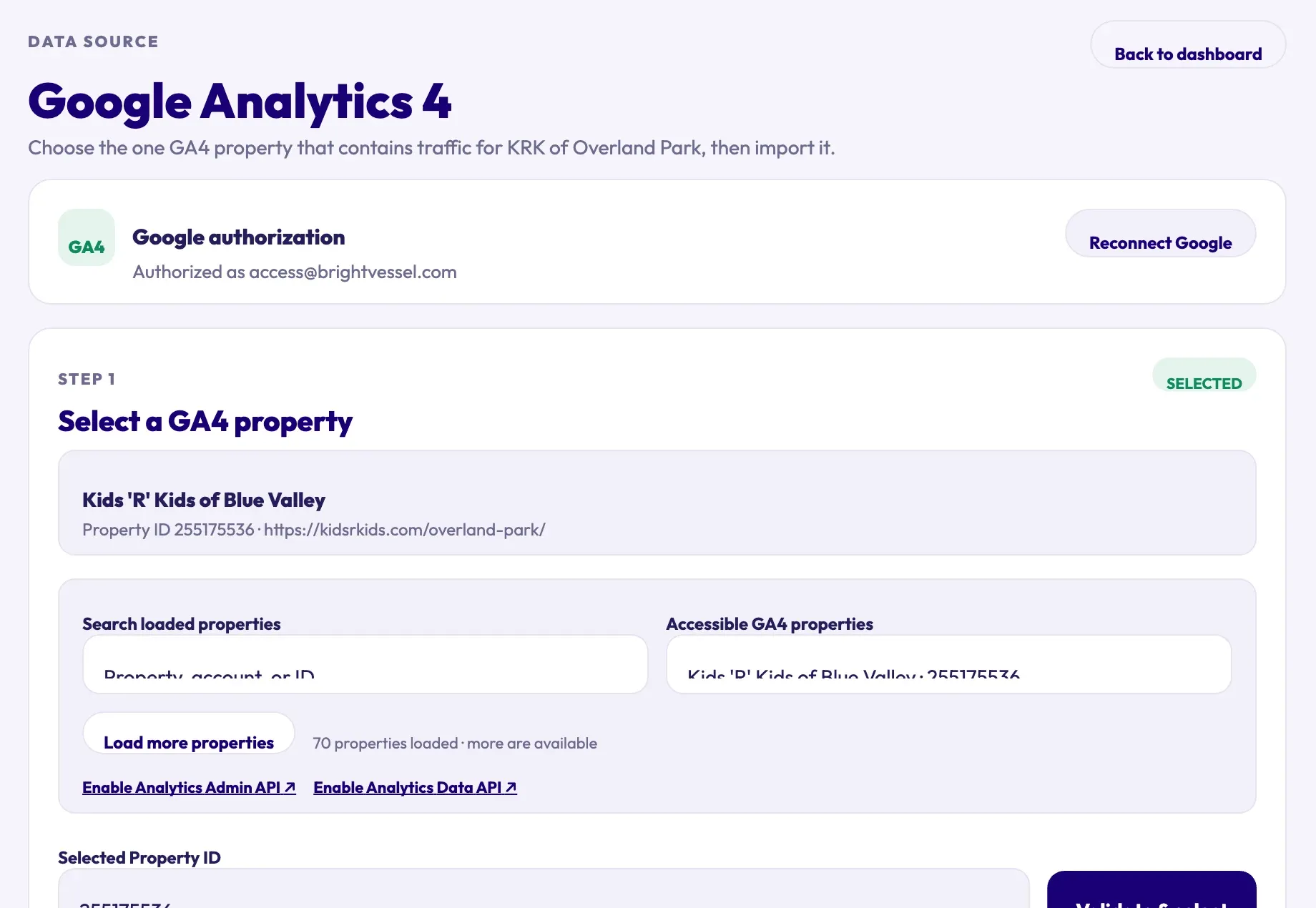
- 01 · Connect
Connect the sources you already have
Authorize Google once and pick the property and ad account for each school. SchoolTracker pulls directly from the sources that matter, so what you see reflects your school right now, not a snapshot from weeks ago.
- Google Analytics 4, Google Ads and Search Console
- Read-only access — nothing in your accounts is changed
- Syncs automatically every day
- 02 · Decode
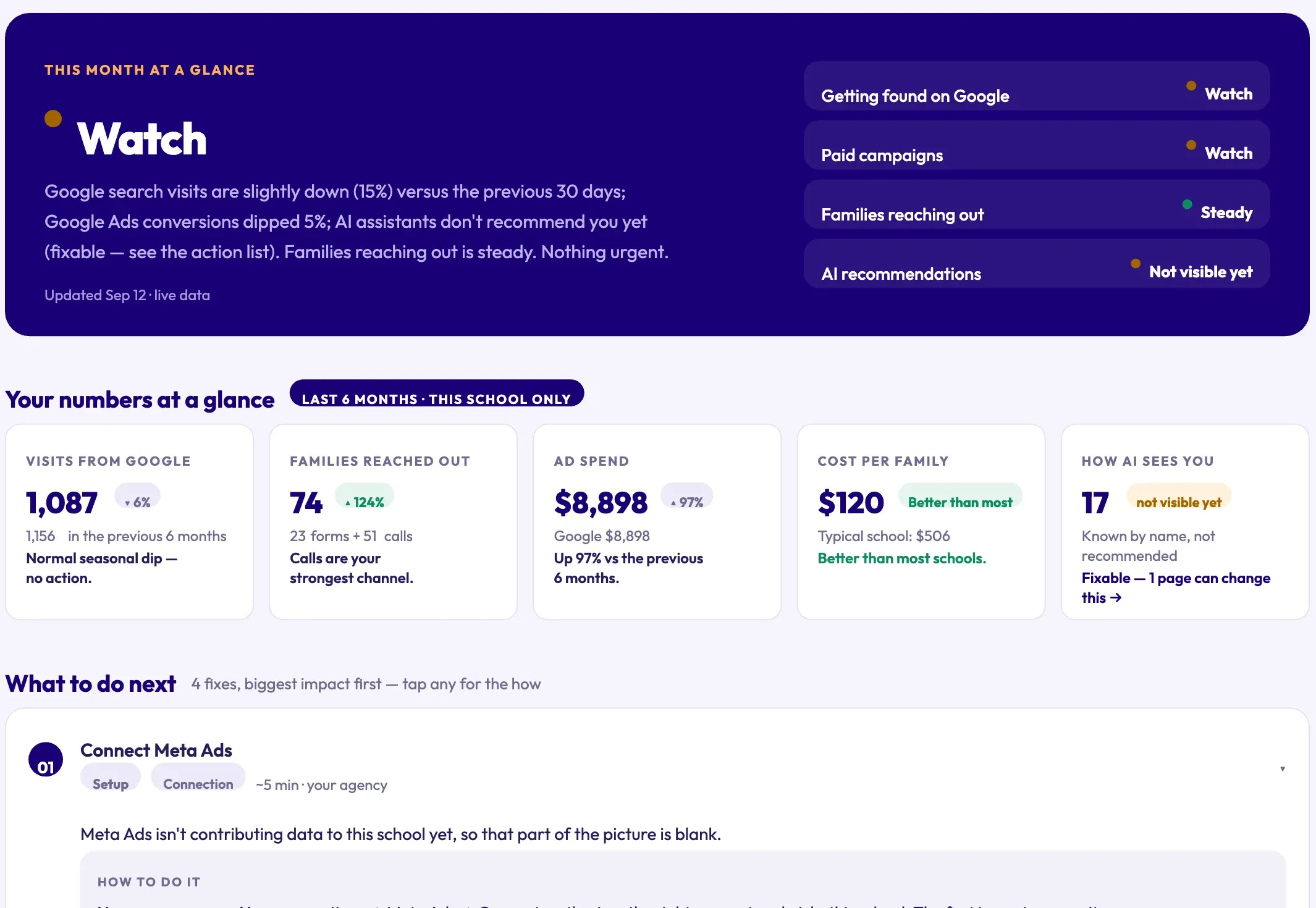
One verdict, in plain English
Every school opens on a single status for the period and the handful of numbers that matter — visits from Google, families who reached out, ad spend, cost per family and how AI sees you — each compared with the period before.
- Four signals: Google, paid, families and AI
- Benchmarked against similar schools
- 03 · Act
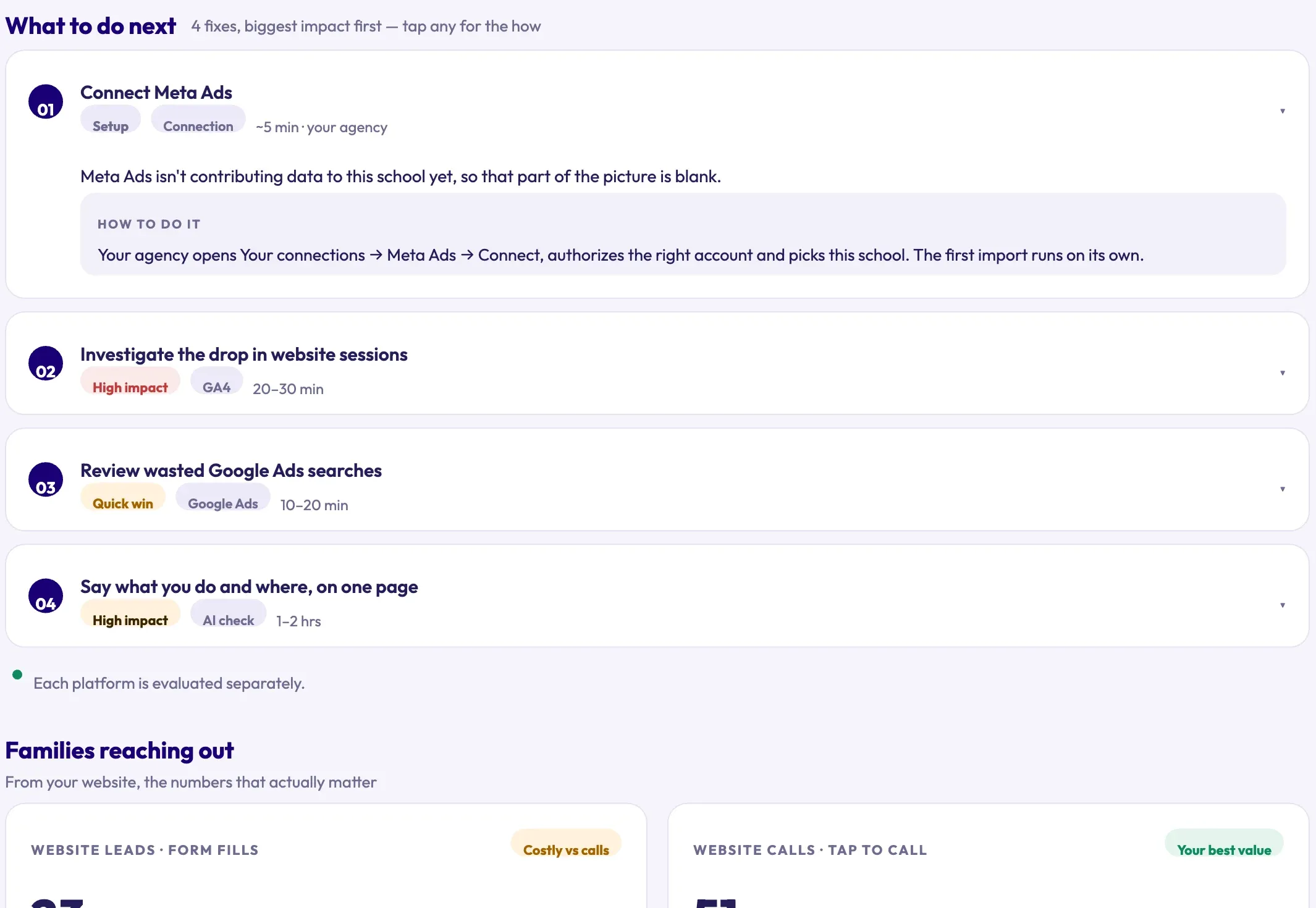
The one thing to fix next
Findings arrive as a short, ranked action list — biggest impact first, each with the time it takes and a plain “how to do it.”
- Tagged high impact or quick win
- Step-by-step instructions for every fix
One source of truth, for every channel
Overview, ads, search and AI visibility — each channel reported on its own terms, then summarized in one place.
Everything that needs attention, in one view
A live snapshot of your school's digital health in one view, including your SEO health score, your AI visibility score, your top priority right now, and a summary of what needs your attention.
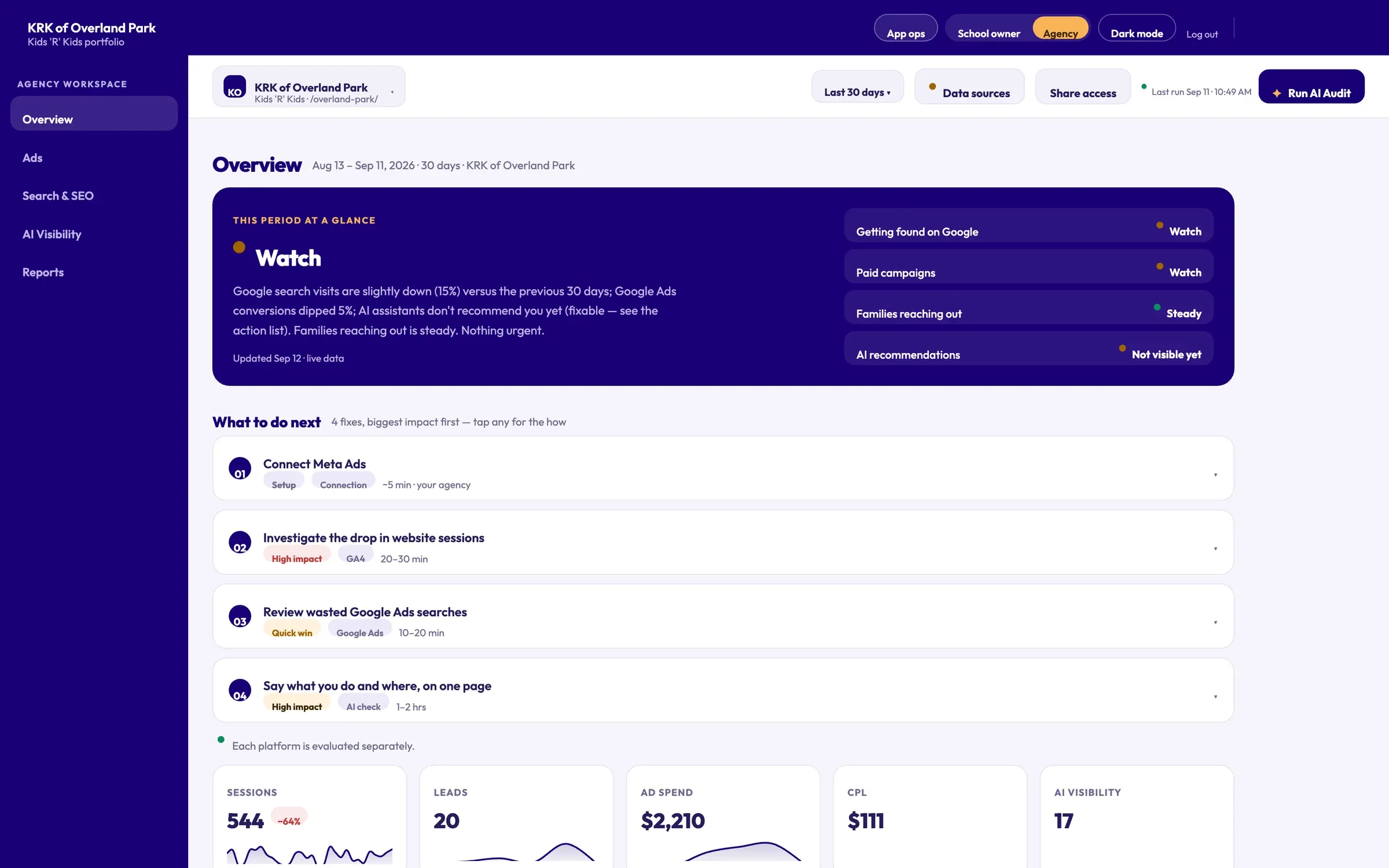 1 A plain-English verdict for the period 2 Four signals: Google, paid, families, AI 3 Fixes ranked by impact, with time estimates 4 Sessions, leads, spend and cost per lead
 - 1 A plain-English verdict for the period
- 2 Four signals: Google, paid, families, AI
- 3 Fixes ranked by impact, with time estimates
- 4 Sessions, leads, spend and cost per lead
Spend tied to real outcomes
Spend, clicks, impressions, conversions, campaign performance, converting keywords, search terms, and device performance, all tied to real outcomes.
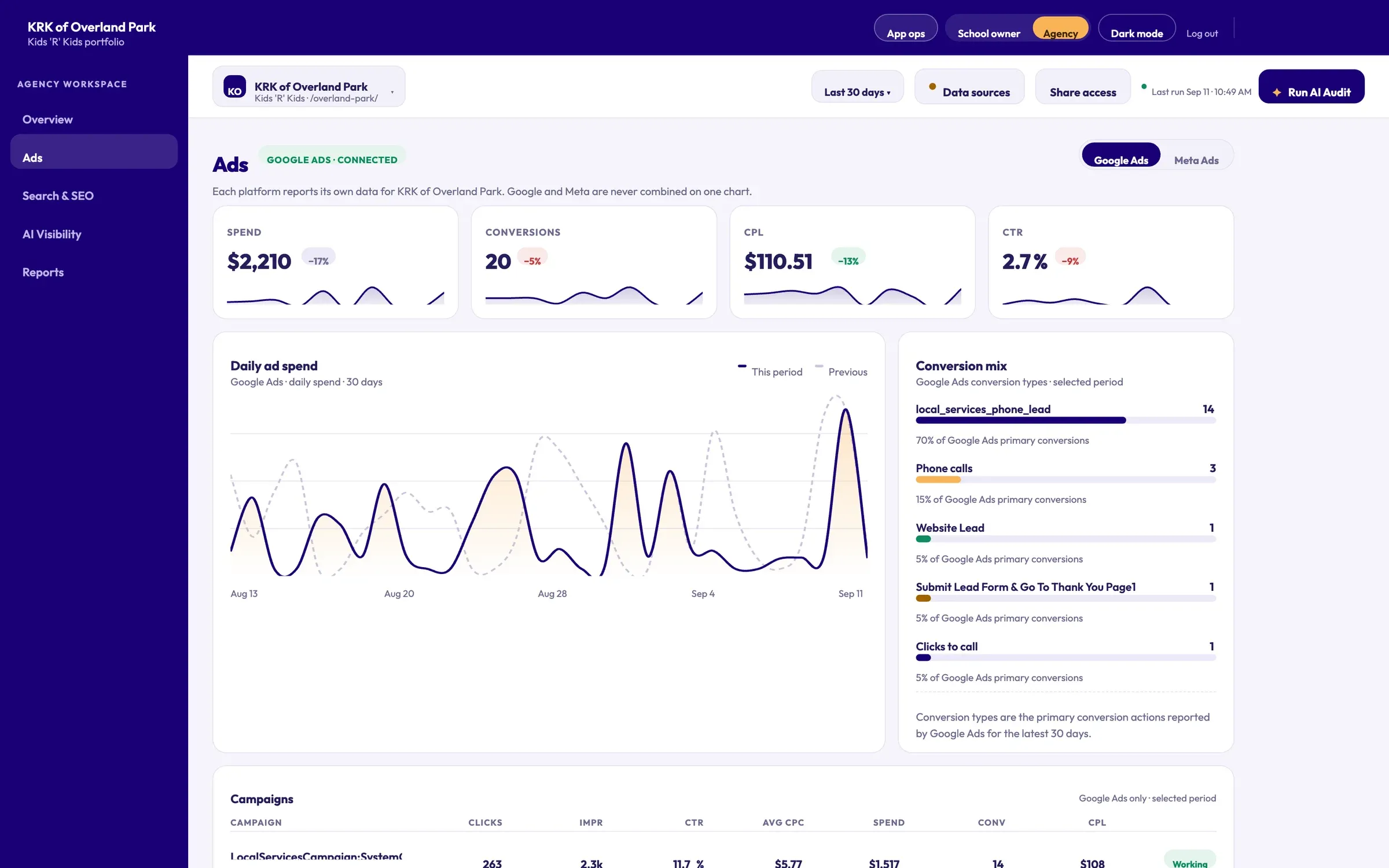 1 Spend, conversions, CPL and CTR vs. last period 2 Google and Meta reported separately, never blended 3 Daily spend against the previous period 4 Which conversion types actually produce leads
 - 1 Spend, conversions, CPL and CTR vs. last period
- 2 Google and Meta reported separately, never blended
- 3 Daily spend against the previous period
- 4 Which conversion types actually produce leads
How families find you on Google
Total clicks, impressions, click through rate, average position, and tracked keywords, with monthly trends, a full query list, and a technical crawl that scores every page.
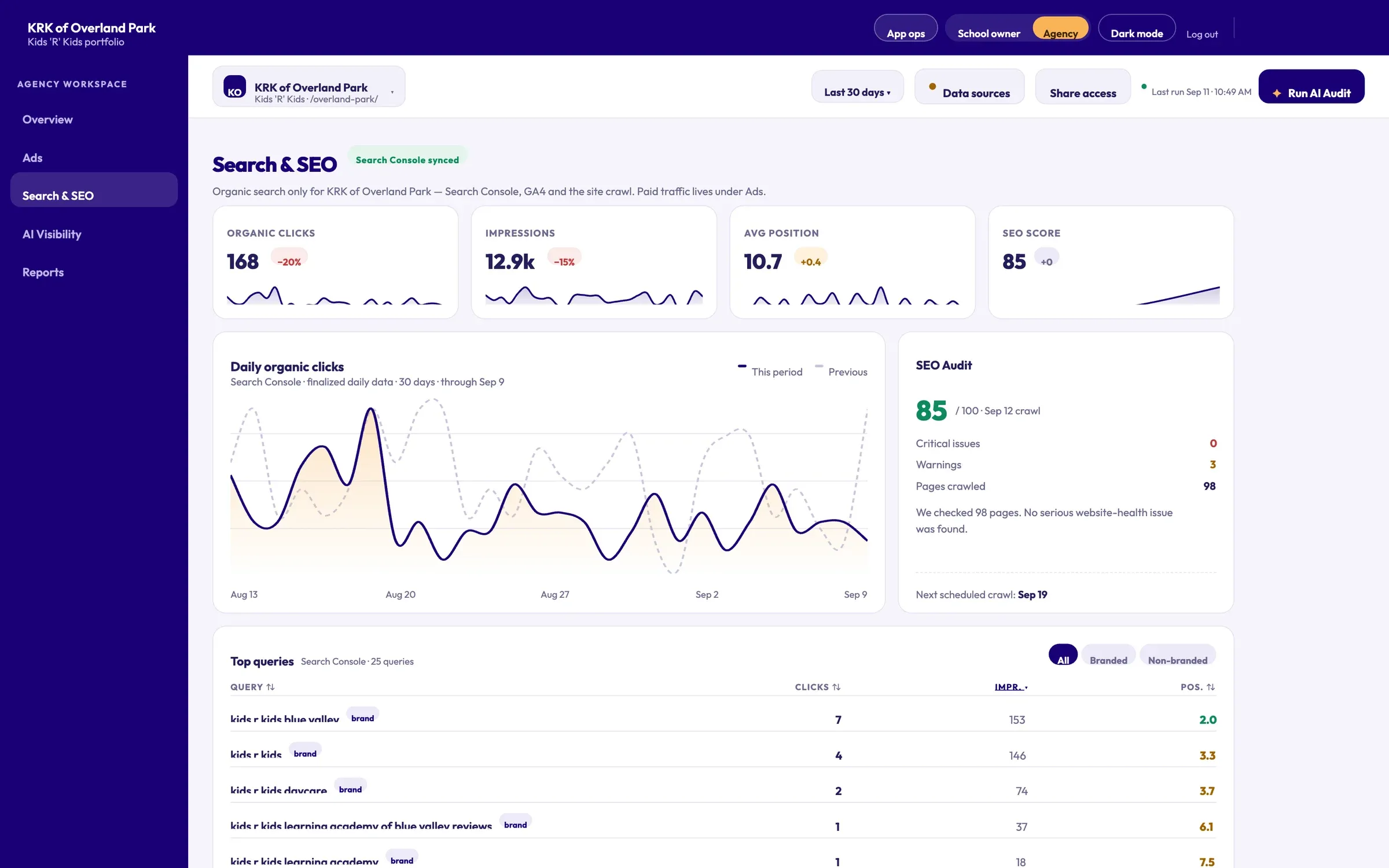 1 Organic clicks, impressions, position, SEO score 2 Technical crawl score, re-checked on a schedule 3 Every query parents search, branded vs. non-branded
 - 1 Organic clicks, impressions, position, SEO score
- 2 Technical crawl score, re-checked on a schedule
- 3 Every query parents search, branded vs. non-branded
How AI sees you
Your school scored across ChatGPT, Claude, and Gemini, with an overall number and a breakdown by engine, so you know exactly how AI sees you.
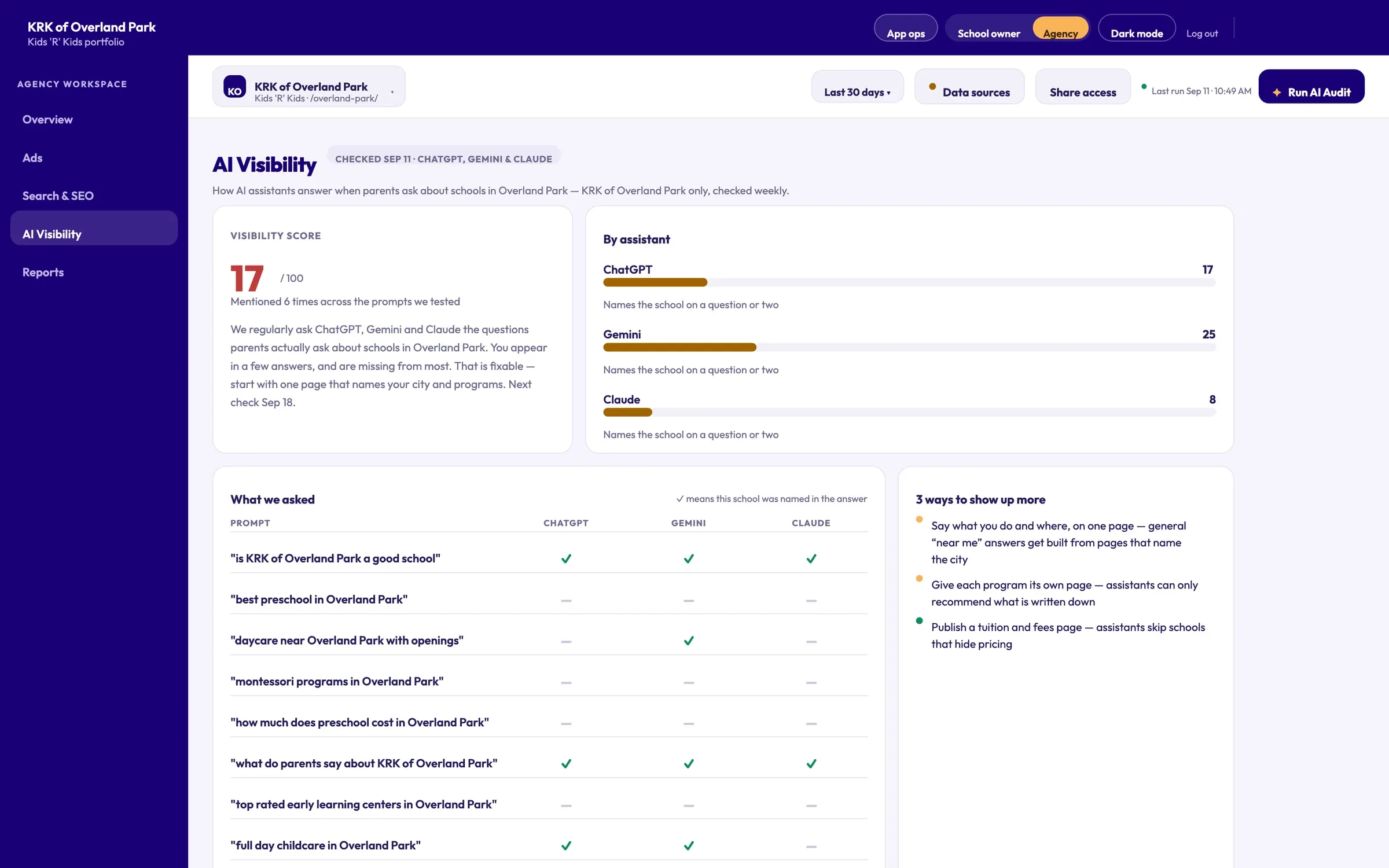 1 One visibility score out of 100 2 ChatGPT, Gemini and Claude scored separately 3 The real questions parents ask, checked weekly 4 What to publish to get recommended
 - 1 One visibility score out of 100
- 2 ChatGPT, Gemini and Claude scored separately
- 3 The real questions parents ask, checked weekly
- 4 What to publish to get recommended
When a parent asks ChatGPT for the best school near them, does your name come up?
Every week, SchoolTracker asks ChatGPT, Gemini and Claude the questions parents actually ask about schools in your area, and records who gets named. The score tells you where you stand. The list tells you how to change it.
Sample score — named in a few answers, missing from most.
- ChatGPT 22Names the school on a question or two
- Gemini 31Names the school on several questions
- Claude 11Knows the school, doesn't recommend it yet
| Prompt | ChatGPT | Gemini | Claude |
|---|---|---|---|
| “best preschool in [your city]” | – | – | – |
| “daycare near [your city] with openings” | – | ✓ | – |
| “full day childcare in [your city]” | ✓ | ✓ | – |
| “how much does preschool cost in [your city]” | – | – | – |
| “what do parents say about [your school]” | ✓ | ✓ | ✓ |
| “is [your school] accepting new students” | ✓ | ✓ | ✓ |
- 1Say what you do and where, on one page
General “near me” answers get built from pages that state the city and the programs in plain words.
- 2Give each program its own page
Ages, hours and what a day looks like — assistants can only recommend what is written down somewhere they can read.
- 3Publish a tuition and fees page
Assistants skip schools that hide pricing when a parent asks what preschool costs, and parents ask that constantly.
Built for the owner and the agency
The same school and the same numbers, presented for the person reading them.
Plain English for owners
Owners see what happened this month, what it cost to reach each family and the one fix worth their time, without learning a single marketing acronym.
The full workspace for agencies
Agencies get every channel in depth — campaigns, queries, crawl results and AI prompts — across every school they manage, with the owner's view one click away.
Live data, pulled on demand
Each platform reports its own data. Google and Meta are never blended on one chart.
- Google Analytics 4
- Google Ads
- Meta Ads
- Search Console
- Site crawl
- AI check
Checked every day, scored against similar schools and translated into plain English.
- A status verdict for the period
- Numbers at a glance, with trends
- A ranked list of what to fix next
- A monthly plain-English report
One platform everyone can understand
- 01
Owners and leadership
See the health of every location at a glance and know where to focus.
- 02
Admissions and marketing
Know which channels and pages drive tours, and what to fix first.
- 03
Multi-location networks
Compare locations and manage the whole network from one place.
Questions schools ask about SchoolTracker.ai
Which data sources does SchoolTracker.ai connect to?
Google Analytics 4, Google Ads and Google Search Console, plus a technical crawl of the school's website and a weekly check of AI assistants. Meta Ads can be connected too. Each platform reports its own data — Google and Meta are never blended on one chart.
Does connecting our accounts change anything in them?
No. SchoolTracker.ai reads reporting data only. Google Ads access is read-only and never calls the endpoints that change campaigns, and for Google Analytics only the one property you select is queried — other properties in the same Google account are never touched.
How often is the data updated?
Connected sources sync automatically every day, and each sync overlaps the previous few days so late Google Analytics attribution is still captured. AI visibility is re-checked weekly, and the website crawl runs on a schedule.
How does SchoolTracker.ai measure AI visibility?
It regularly asks ChatGPT, Gemini and Claude the questions parents actually ask about schools in your area — like “best preschool near me” — and records whether your school is named or recommended. The result is a score out of 100, a breakdown by assistant, and the exact prompts behind it.
What does the “What to do next” list include?
A short list of fixes ranked by impact, each tagged high impact or quick win, with an estimate of the time it takes and step-by-step instructions for how to do it.
Who is SchoolTracker.ai for?
School owners and leadership, admissions and marketing teams, and multi-location networks — plus the agencies that work for them. Owners get a plain-English home view; agencies get the full workspace across every school they manage, with the owner's view one click away.
How do school owners stay updated without logging in?
Each school owner can receive one plain-English email report on the 1st of every month, covering what happened and what was fixed — for that school only.
How is it different from a monthly agency report?
It's live rather than a snapshot, written in plain English rather than raw charts, and it always ends with the one thing to fix next. It also benchmarks each school against similar schools, so every number comes with context.
How can we see SchoolTracker.ai on our own school's data?
Request a demo on schooltracker.ai. The team will show it running on your school's actual numbers before you pay anything.
Where SchoolTracker.ai fits
In practice
- Kids 'R' Kids International We manage the complete digital environment for a national childcare franchise, including marketing run independently for individual franchisees across the system. →
- Endeavor Schools Grew a private-school network from 10 to 145+ locations, entirely in-house, with 100,000+ qualified leads and 1000%+ SEO growth. →